Manual · Chapter 21 · Part E Privacy and law
Consent and cookie banners
Purpose
The chat sets no cookies, and a question in the chat is a deliberate act by the visitor. Still, there are good reasons to load the chat only after consent: your privacy policy provides for it, your cookie banner controls all external services, or you want consent to precede the first call to a language model. For this, dAI Pro hooks into common consent solutions, without a banner of its own.
Whether you need consent is a legal question this manual does not answer. It shows how to implement the decision.
Where
In the chat configurator under Integration (Chapter 8):
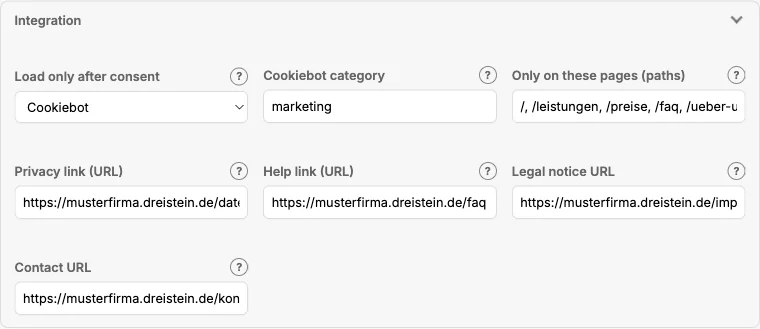
| Field | Meaning |
|---|---|
| Load only after consent | no: load immediately. Cookiebot: waits for the approval of the specified category. Usercentrics: waits for the approval of the service. Custom event: waits for an event your website fires. Cookie is set: waits until a specific cookie is present. |
| Cookiebot category / value | The category (e.g. marketing), the service name, the event name or the cookie name, depending on the mode. |
| Text until consent | What stands in place of the chat as long as consent is missing. Only visible with an inline embed; the bubble appears only after consent. |
How it works
- The embed code loads as always, but small: it only checks the consent.
- If it is missing, it waits. With an inline embed it shows the text until consent; the bubble stays invisible.
- When the visitor gives consent, the chat loads on demand, without reloading the page.
- If the visitor later withdraws consent, this takes effect on the next page view.
Until consent, nothing is transmitted to dAI Pro, not even the request for the settings.
The modes in detail
| Mode | What your website must provide |
|---|---|
| Cookiebot | Nothing extra. dAI Pro reads the approval of the category and reacts to Cookiebot's events. |
| Usercentrics | The service must be created in the Usercentrics configurator; the value is its name. |
| Custom event | Your website fires an event with the specified name as soon as consent is given. For any other consent solution. |
| Cookie is set | Your consent solution sets a cookie on consent; the value is its name. |
The details for developers are in Chapter 28.
What the chat itself does
- It sets no cookies. The conversation history is kept in the browser's session storage and is gone when the browser is closed.
- It remembers whether the bubble was closed, likewise only for the visit.
- The help text in the chat (Chapter 8) explains to visitors what happens with their question and links to your privacy policy.
Frequently asked questions
The chat does not appear despite consent. Check the value: the Cookiebot category must be named exactly as in the banner, the Usercentrics service exactly as in the configurator. Case matters.
Does the consent also apply to the search? The search has no consent mode; it only sends the search query. If you want to put it behind consent as well, include the script tag via your own consent solution.
Must the help text mention the consent? The generated help text describes where the question goes and what is stored. Extend it if your privacy policy requires more.
See also
- Chapter 8 · Embedding the chat
- Chapter 20 · Processing region and sovereignty
- Chapter 28 · Embed reference