Manual · Chapter 19 · Part D Day-to-day operation
Usage and costs
Purpose
Every call to a language model costs money, usually fractions of a cent, but noticeable in total. dAI Pro logs every call per collection, purpose and model and converts it into costs using the stored list prices. So you see what the chat, the search, the agents and the indexing cost, and what a resolved request is worth on average.
Where
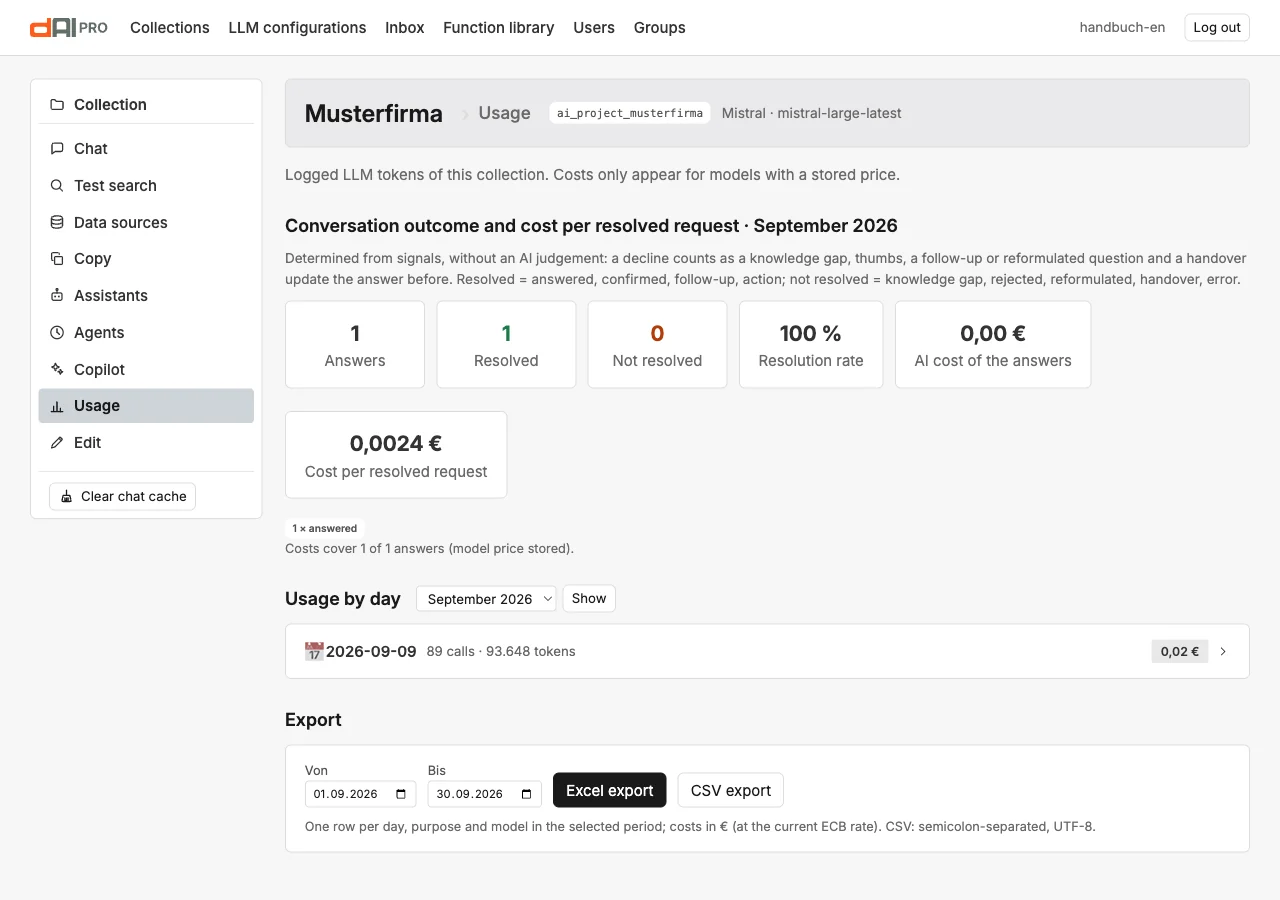
Open Usage in the collection rail.
Storing prices
The box Configure prices applies to all collections of the instance. For each model you enter the provider's list prices: input and output per million tokens, for text recognition per 1,000 pages, for audio per minute, for image models per image (column “€/image”), plus the share a hit in the provider's cache costs. Prices in the provider's currency; dAI Pro converts dollar prices into euros at the current reference rate of the European Central Bank. Without a price, only tokens are shown, no costs.
A separate rule applies to image models. If the image model reports tokens and token prices are stored for the model, dAI Pro calculates exactly by tokens. The price per image applies only to image models that report no tokens, or when no token prices are stored. dAI Pro never charges both for the same image. OpenAI and Gemini report tokens for every image. For their current image models, therefore, enter the token prices; for the retired gemini-2.5-flash-image the price per image is enough as long as no token prices are stored for the model.
Calculating by tokens pays off because the price of an image varies widely. With OpenAI it depends above all on the quality: an image in “High” costs about six times as much as “Standard”. Reference images from the corporate design add input tokens. The price table has one input price per model; dAI Pro charges all input tokens at that price, including those of the reference images. For the OpenAI image models the image-input price is therefore entered, because reference images make up most of the input. Tasks without reference images are overestimated by a fraction of a cent.
| Image model | Provider's list price (as of September 2026) | What an image roughly costs |
|---|---|---|
gpt-image-2.5-flare, gpt-image-2.5-sunburst (OpenAI) | text input 5 $, image input 8 $, image output 30 $ per million tokens | Output at 1024 × 1024 or 1536 × 864 pixels: “Draft” about 200 tokens (about 0.006 $), “Standard” about 280 tokens (about 0.008 $), “High” about 1,750 tokens (about 0.05 $), each plus input |
gemini-3.1-flash-image (Google) | image output 60 $ per million tokens | about 1,120 image tokens per image at the 1K tier, so about 0.067 $ |
gemini-2.5-flash-image (Google, retired) | 0.039 $ per image | 0.039 $ |
The values apply to the smallest size. Larger formats and higher resolutions (Chapter 18) cost more output tokens: with OpenAI by pixel count, with Gemini by the 2K or 4K tier. Images you upload for a job count as image input, like reference images. Diagrams cost only the chat model call in every size.
With the gpt-image-2.5 models, “Very high” and “Maximum” sit well above “High” again; the actual tokens of each job appear in the usage view after the run. Every variant and every edit with a hint counts as an image of its own. Text as a separate layer costs no image tokens, only one call to the render service.
Conversation outcome and cost per resolved request
The upper block assesses the current month without an AI verdict, from signals alone: a refusal counts as a knowledge gap; thumbs, follow-up question, rephrasing and handover update the answer before them.
| Metric | Meaning |
|---|---|
| Answers | All answers of the chat in the month. |
| Resolved | Answered, confirmed, follow-up question, action triggered. |
| Not resolved | Knowledge gap, rejected, rephrased, handover, error. |
| Resolution rate | Resolved divided by all. |
| AI cost of the answers | Cost of all answers with a stored price. |
| Cost per resolved request | The number that counts: what a request costs that the chat actually dealt with. |
Usage by day
Per day an expandable block with calls, tokens and costs, containing the table per purpose and model:
| Column | Meaning |
|---|---|
| Purpose | The purpose: chat, search, embedding, agent, Copilot, Copilot images, voice chat, endpoint for agents. |
| Model | The model used. |
| Calls | Number of calls. |
| Tokens in, of which cache hits, of which cache new | Input tokens and how many of them came from the provider's cache. A high share of cache hits makes CAG mode inexpensive. |
| Tokens out | Output tokens. |
| Pages, minutes | For text recognition and audio. |
| Costs | According to the stored price, in euros. |
The editorial Copilot (Chapter 18) is split across two purposes. “Copilot” covers the texts, the image briefs, the structure of diagrams, the texts of documents including their diagrams and the check calls of the self-check. “Copilot images” covers the generated illustrations, including a second image after a deviation.
Export
Excel export and CSV export deliver one row per day, purpose and model in the selected period, with costs in euros. For the cost centre, for reconciling with the provider's invoice or for your own analyses.
What drives costs
- Long answers and long conversations. Every answer carries the history with it. The main prompt can afford to be brief.
- Search while typing (Chapter 9): every intermediate input is a summary.
- Re-indexing. Every processed document costs embeddings; the freshness guard processes only what has changed.
- Agents with an AI verdict: quality audit, golden set with judge, content guard. Their schedule determines the costs.
- Illustrations: every image, plus the self-check and possibly a second image. The quality “High” costs a multiple of “Standard”. It is cheaper with the quality “Draft” or without the self-check. Diagrams cost only one call to the chat model.
- Documents: one call to the chat model with a lot of context, plus one per diagram. A finished text draft set with As PDF and Word costs no call.
- The answer cache saves: the same questions do not cost a second time.
Frequently asked questions
The costs show 0.00 euros. No price is stored for the model. Enter it in the "Configure prices" box; the conversion applies retroactively to the usage.
The total differs from the provider's invoice. List prices, exchange rate fluctuations and rounding. The usage in tokens is correct; the costs are an estimate based on list prices.
Does the test chat in the backend count? Yes, like any other call.
I entered a price per image, but the costs follow the tokens. Token prices are also stored for the model, and the model reports tokens. In that case dAI Pro calculates by tokens. If you want to charge per image, clear the model's token prices.
See also
- Chapter 15 · Agents
- Chapter 16 · Quality cockpit
- Chapter 18 · Editorial copilot (illustrations, diagrams, documents)
- Chapter 24 · Configuring language models