Manual · Chapter 18 · Part D Day-to-day operation
Editorial copilot
Purpose
The Copilot writes drafts for the editorial team from the knowledge of the collection, in the style of the website: page texts, meta descriptions, summaries, posts for social media and alt texts for images. It also generates images: illustrations with an assigned image model and diagrams from fixed templates in the corporate design. And it sets documents such as guides or fact sheets as PDF and Word on the collection's letterhead. It knows only what is in the collection. What is missing it marks in the draft as [MISSING: …] instead of making it up. Texts are not saved: check the draft, copy it, use it.
Where
Open Copilot in the collection rail.
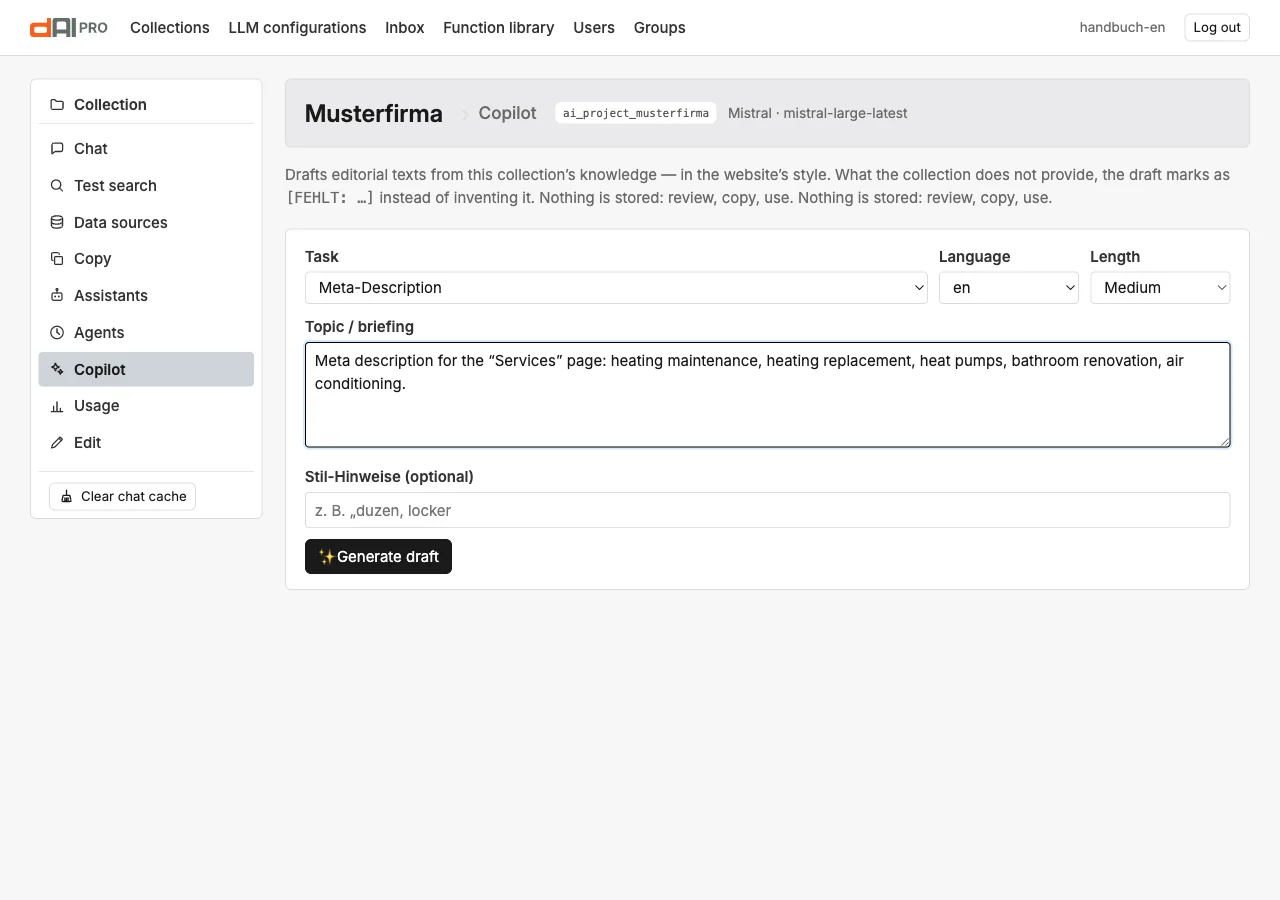
| Field | Meaning |
|---|---|
| Task | Page text draft, Meta description, Summary, Social media post, Alt texts for images, Illustration, Diagram or Document (PDF and Word). Each task has its own rules for form and length. |
| Language | A language of the collection. The Copilot uses the content in this language. |
| Length | Short, medium, long. For meta descriptions the character limit applies anyway. For a document the length stands for about 350, 750 or 1,400 words. For Illustration and Diagram the field is hidden; there you choose the format instead. |
| Topic / briefing | What it is about: a page, a product, an occasion. The more specific, the better the draft. |
| Style notes | Optional: tone, form of address, words that should or should not appear. |
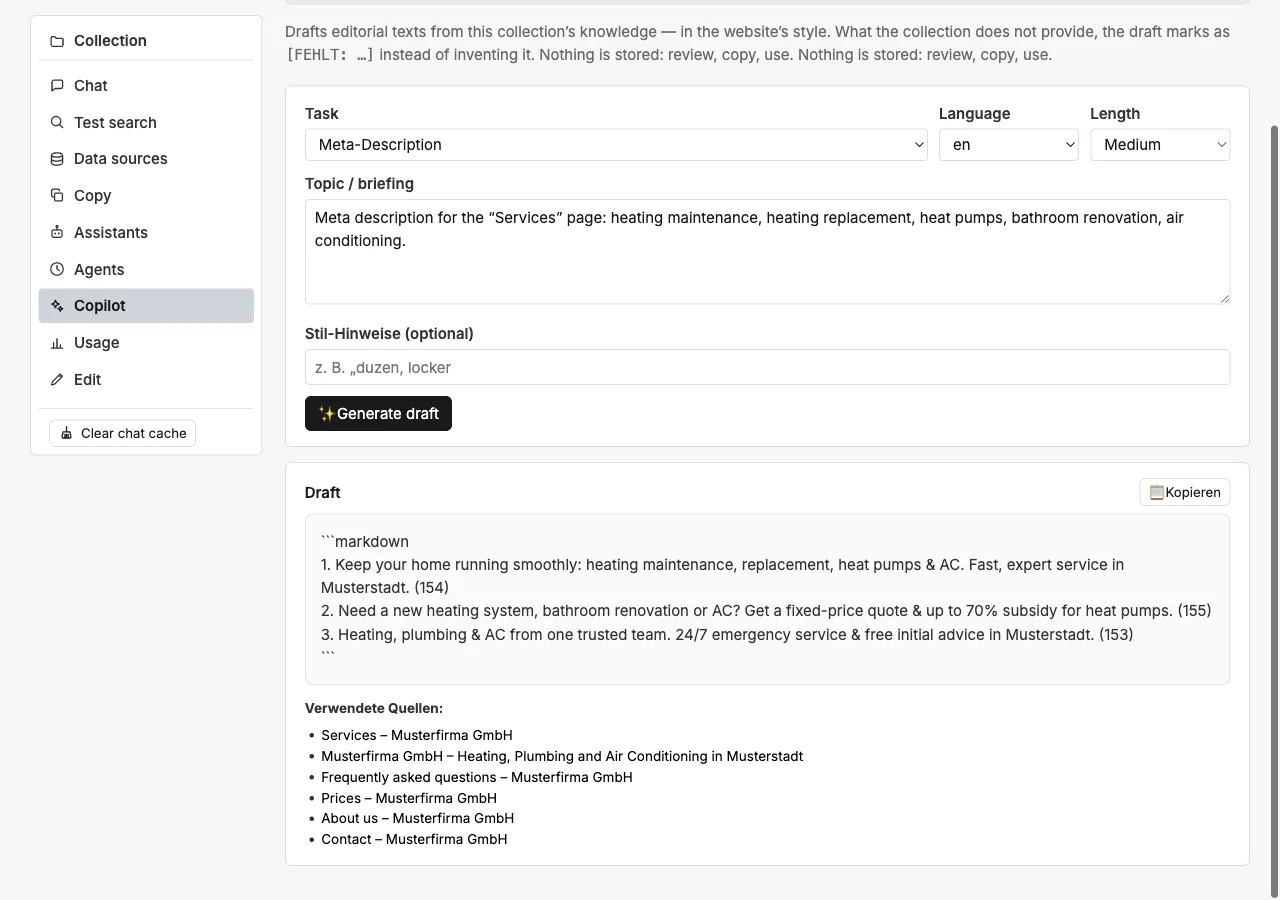
Generate draft delivers the result after a few seconds with a button for copying. If the render service can set PDFs, the button As PDF and Word appears next to it (section “Documents”).
The tasks
| Task | Result |
|---|---|
| Page text draft | A structured text with subheadings, from the collection's content on the topic. Gaps as [MISSING: …]. |
| Meta description | One or two sentences in the length search engines display, with the terms of the page. |
| Summary | The core of a topic in a few sentences, for instance for teasers or newsletters. |
| Social media post | A short post with occasion and call to action, without invented promotions or prices. |
| Alt texts for images | Descriptions for the images the collection knows on the topic. |
| Illustration | An AI-generated image on the topic, with alt text, caption and self-check. Needs an assigned image model; section “Illustrations”. |
| Diagram | A graphic from a fixed template in the corporate design: process flow (also with yes/no branches), step-by-step guide, comparison table, timeline, hierarchy or key figures, with alt text and caption. Needs the render service; section “Diagrams”. |
| Document (PDF and Word) | A guide, a data sheet, an FAQ, a fact sheet or a report as PDF and Word, on the collection's letterhead, with citations, a list of sources and, on request, diagrams and images. Needs the render service with PDF support; section “Documents”. |
As a rule of thumb: use an illustration for mood and symbolism. When labels, order or numbers have to be exactly right, use a diagram. When the result is to be sent out or printed as a file, use a document.
Illustrations
The task Illustration delivers an image rather than a piece of text. As with every task, the Copilot fetches the context from the collection, the collection's chat model writes the image brief from it, and an image model renders it. On request, the Copilot checks the result before you see it.
Prerequisite. An image model must be assigned to the collection: in the collection settings under “Additional language models” in the field “Image model (copilot illustrations)” (Chapter 4). Only image-capable configurations are available, today OpenAI and Google Gemini. There is no fallback to the chat model: which provider generates images and in which region remains the operator's decision. Without an image model, the Copilot shows a note with the way into the settings instead of the button.
How to use it.
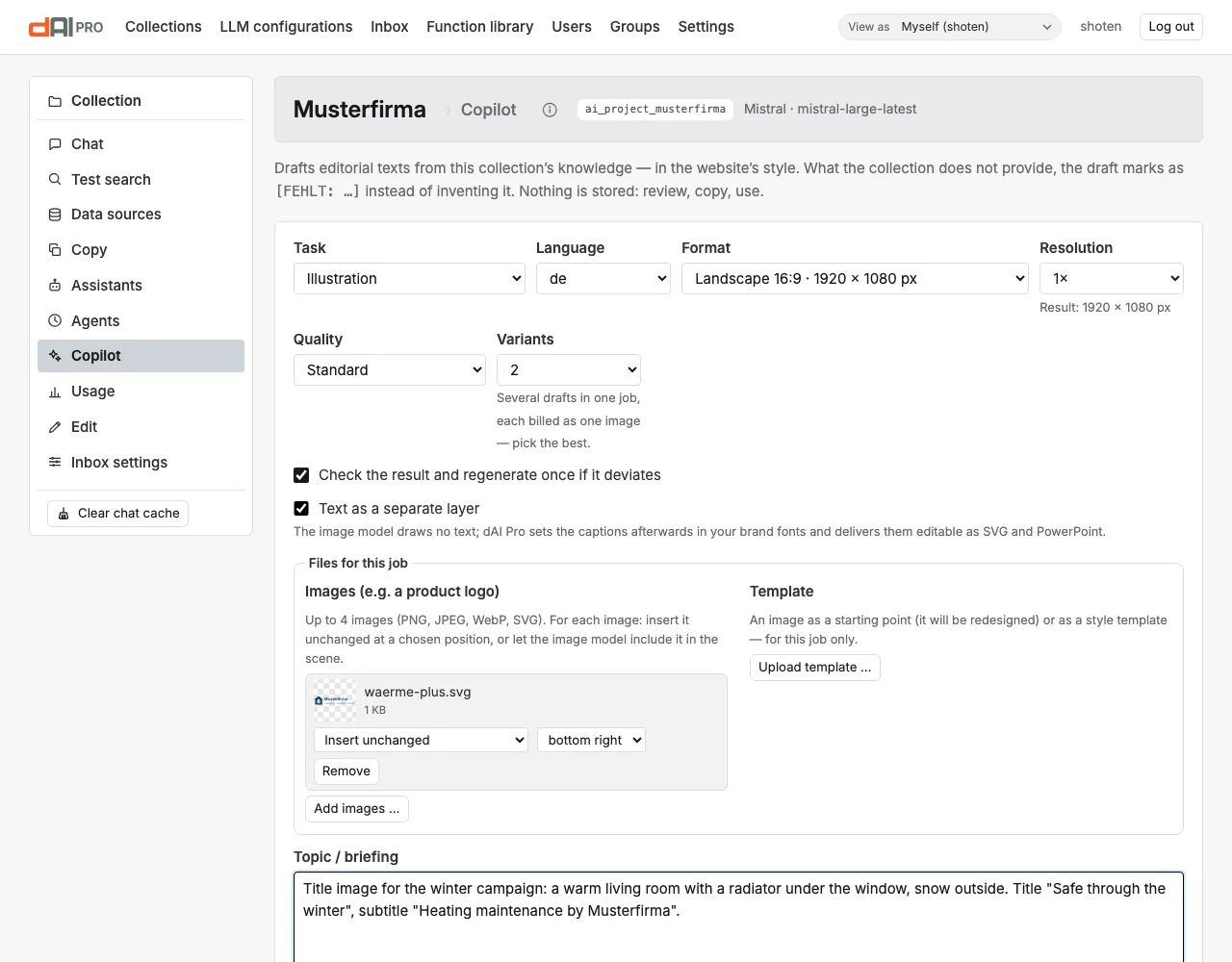
- Choose the task Illustration, the language, the Format and the Resolution (section “Formats and resolution”). Below the resolution you see the size of the finished image in pixels.
- Choose the Quality: Draft (fast) for first ideas, Standard for most cases, High (slower) for the image that goes on the page. With OpenAI, “High” costs about six times as much as “Standard” (Chapter 19). The models
gpt-image-2.5-flareandgpt-image-2.5-sunburstadditionally offer Very high and Maximum — even more detail, even slower and more expensive; these two levels are only offered when such a model is assigned. With Gemini, the resolution tier 1K, 2K or 4K follows the image size; “High” uses at least 2K (Chapter 24). - If you like, choose Variants: 2, 3 or 4 drafts in one job, from which you pick the best. The field only appears for image models that deliver several images per call (OpenAI's gpt-image models). Each variant counts as one image — for the monthly limit and for usage; the search and the image brief run only once.
- Leave the checkbox Check the result and regenerate once if it deviates ticked. It is preset; what it does is described below under “Self-check”. With several variants the Copilot checks each one but does not regenerate — you are choosing anyway.
- Tick Text as a separate layer if the image should carry a title or captions. The image model then draws no text; dAI Pro sets it afterwards in your brand fonts and delivers SVG and PowerPoint along with it (section “Text as a separate layer” below). The checkbox appears only when the render service is set up (Chapter 26).
- Under Files for this job you can upload images, for instance a product logo, and a template as starting image or style template (section “Files for a job”).
- Describe in the briefing what the image should show: subject, occasion, mood, and labels and number of elements if needed. Put design wishes such as “white background” or “blue tones only” into the Style notes instead. They are just as binding there but do not disturb the search in the collection.
- Click Generate draft. While the job runs, the Copilot shows the step it is in: search, image brief, image model, check, saving. With OpenAI's gpt-image models a preview image appears in the preview as soon as the model delivers one — from quality “Standard” upwards usually after a few seconds; at “Draft” the image is often finished before a preview arrives. The preview is slightly dimmed and labelled “Preview while the image model is still working”.
What happens during generation.
- Search. The Copilot searches the collection using only the content part of the briefing. It leaves design wishes such as “white background” out of the search so that they do not dilute the results.
- Image brief. From the briefing and the matches, the collection's chat model writes the brief: subject, labels, background wish, number of elements, alt text, caption and the list Not covered by the collection. It names at most three facts the image is meant to show that are missing from the collection, for instance the name of a menu item. Style, colours, perspective, composition or mood never appear there; for a pure mood image the list stays empty. For the brief a fixed order of precedence applies: explicit requirements in the briefing (background, colours, labels, number of elements, format) take precedence over the corporate design. The corporate design applies to everything the briefing leaves open.
- Completion. dAI Pro completes the brief itself so that these details are stated the same way and in full for every image: the colour palette from the corporate design, with colour names, because image models match colour values such as
#1f4e79poorly; the background; the rule for text; the number of repeated elements. Labels appear only if the briefing asks for them, and then word for word in the selected language. Otherwise text in the image is forbidden. - Background. With OpenAI, the image model delivers a transparent background, which dAI Pro then fills with the desired colour down to the pixel. The colour comes from the briefing, otherwise from the corporate design, otherwise it is white. If you explicitly ask for “transparent”, you get a cut-out PNG and WebP. Gemini delivers images without transparency. There the background is only described, the image matches the colour only roughly, and the self-check only verifies that it is plain and roughly right.
- Reference images. The reference images from the corporate design (Chapter 4) are sent along to OpenAI and Gemini as a style guide: for palette, line weight, shapes and level of detail, not as content. If the job has its own files, they go first: the starting image, the images to include and the style template. A style template of the job replaces the reference images of the corporate design.
- Self-check. If the checkbox is ticked, the chat model of the image configuration checks the finished image against the requirements: labels, number of elements, background, no other logos, included images present, matching subject. If the image deviates, the Copilot generates it again exactly once, with a correction note for the image model.
- Format and logo. dAI Pro crops the image centrally to the chosen format, brings it to the chosen size and places images set to “Insert unchanged” at their position. Only then does it write the marking into the image.
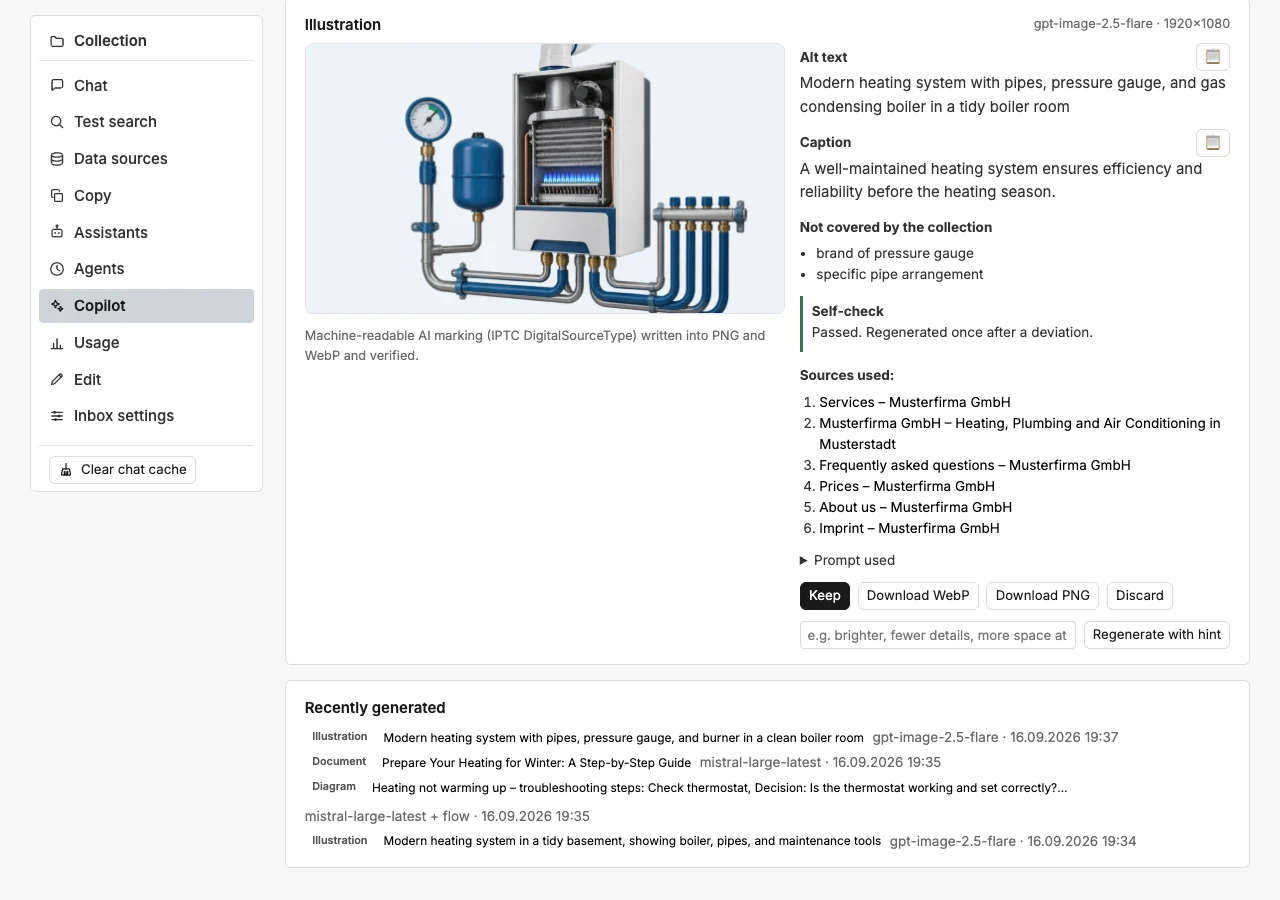
Result. The preview appears with alt text and caption for copying. The alt text has at most 125 characters. If the suggestion is longer, dAI Pro shortens it at a word boundary and ends it with “…”. Below that you find the gaps, the Self-check box, the sources used and, in a collapsible section, the prompt used. Plus the buttons:
| Button | Effect |
|---|---|
| Keep | Marks the image as kept. It stays in the list “Recently generated” and is not cleaned up. |
| Download WebP, Download PNG | Downloads the file with the AI marking. |
| Discard | Deletes the image together with its files. |
| Regenerate with hint | A short hint such as “brighter, fewer details, more space at the top”, then the task runs again with the same briefing in the same format. |
| Edit this image with hint | Only for image models that can work image-to-image (OpenAI's gpt-image models, Gemini). The shown image stays the starting point; the model changes only what the hint says — see “Editing instead of regenerating”. |
Variants. If you ordered several variants, they appear as tiles below the preview, numbered 1 to 4. A click shows the variant with its alt text, caption and check; Keep, Discard and Download always apply to the one shown. The others remain interim results and disappear after one day unless you keep them. If you later open a variant from “Recently generated”, its siblings reappear as tiles.
Editing instead of regenerating. A new run rerolls the subject. If you like the image and only a detail is missing, write the wish into the hint field and click Edit this image with hint: “make the needle red”, “add a small cloud at the bottom right”, “replace the word ‘Begin’ with ‘Start’”. The collection's chat model turns the wish into an edit instruction and adjusts labels, alt text and caption only as far as the change affects them; the image model receives the image and changes it at that spot. The result is a new interim result in the same format; the old one stays. Below the preview, Before and Edited appear as tiles for comparison. The self-check verifies that the change is visibly applied and the labels are right — without a retry, because whether the rest stayed unchanged is for you to judge in the comparison. The check box states the origin: “Edited from draft #12: ‘make the needle red’”.
With OpenAI's gpt-image models you can restrict the change to an area: drag a rectangle over the preview with the mouse — it appears dashed in orange, with the note “Only the marked area will be edited” and the button Remove area. The model then changes only that section; everything outside stays pixel for pixel. Without a rectangle the hint applies to the whole image. Models without area editing (Gemini) do not offer the rectangle; an area sent anyway is ignored, and the check box says so. An edited image counts like a new image.
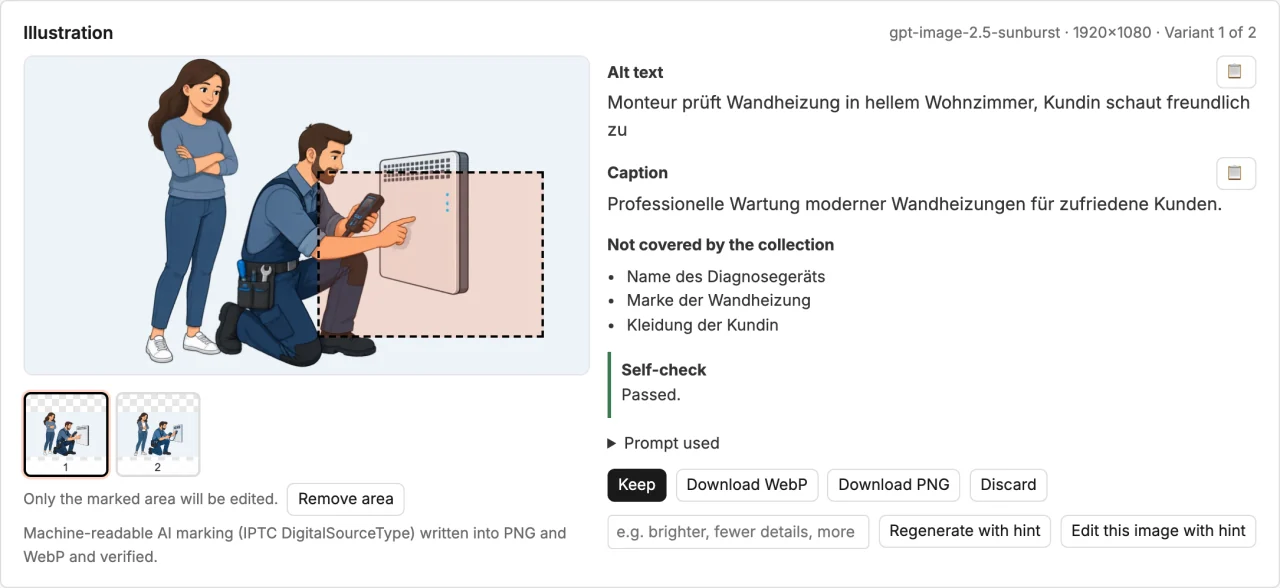
For precise edits with many details, gpt-image-2.5-sunburst is worth choosing as the image model instead of gpt-image-2.5-flare (Chapter 24); both cost the same.
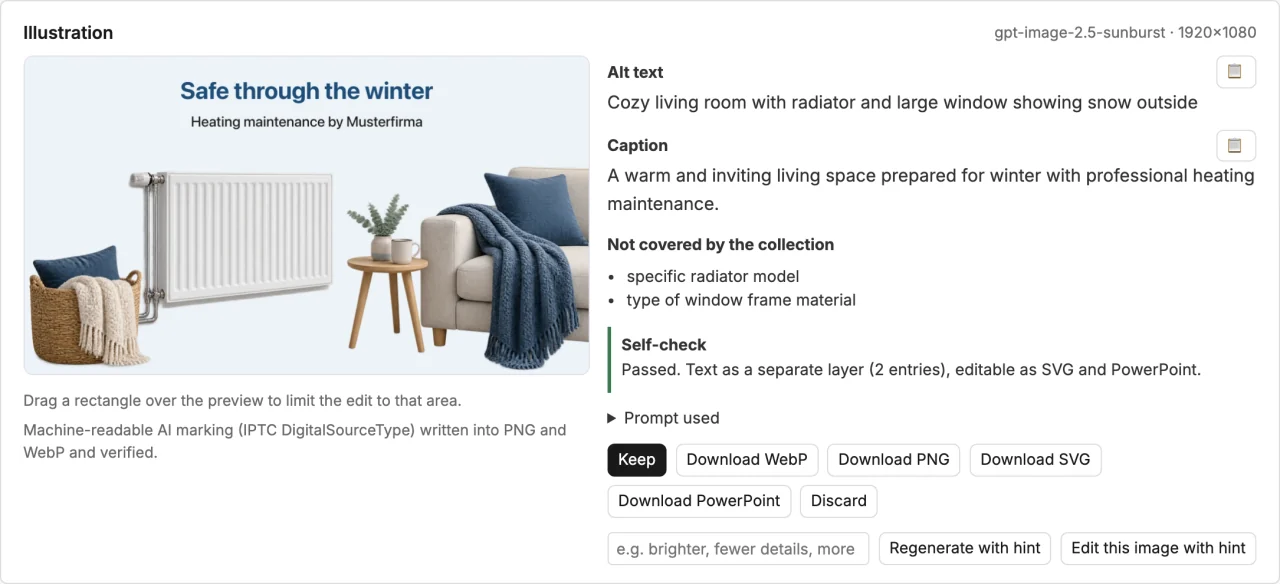
Text as a separate layer. Image models set type unreliably: letters slip, words come out wrong, and the typeface is never your corporate font. With the checkbox Text as a separate layer the image model draws no text at all. The chat model plans the captions with a role (title, subtitle, label) and a position (top, bottom, centre, corners); the image gets calm areas there, and dAI Pro sets the text afterwards in the fonts of your corporate design, with sufficient contrast against the background. The finished image is available as WebP and PNG as usual; two further downloads come with it: SVG with real text elements and PowerPoint with the image as background and one text box per caption. Open either in Illustrator, Inkscape, PowerPoint or Keynote and change the texts there without regenerating the image; when you save to the file list, they come along. The self-check inspects the base image without text (it must contain none); the check box states the number of captions. “Edit this image with hint” works on the base image without text and puts the layer back on afterwards — so a changed text (“replace ‘Begin’ with ‘Start’”) ends up in the layer, not in the image. The checkbox appears only when the render service is set up (Chapter 26). If the briefing names no caption, the image is generated without a layer, and the check box says so.
The layer does not know where inserted logos sit, and a title the planning places in the middle of the image can clash with a busy subject. In such cases, write into the briefing that the title should sit at the top, or move it in the SVG or PowerPoint file.

Declined jobs. If the image model declines a job for content reasons, the Copilot reports this as a notice — with the stage (input or output) and the categories the provider names — rather than as a technical error. Rephrase the briefing; no image is charged.
Self-check. The box shows the result of the check. It reports Passed or Deviations remain with a list of what is not right. If the Copilot regenerated the image, it says “Regenerated once after a deviation”. It also states how many reference images were used as a style guide, which files of the job were used and how, and whether the image had to be enlarged because the model delivered fewer pixels. If the check fails for technical reasons, it says “Check not possible — image unchecked”. The check changes nothing for data protection: the image goes to the same provider that generated it, and no further processor is involved.
Costs. The self-check costs a short check call with the image, a new attempt a second image, each variant one more, an edit one image plus the short call for the edit instruction. Everything appears under “Usage” (Chapter 19): the check and planning calls under the purpose “Copilot”, the images under “Copilot images”. To save money, untick the checkbox or choose the quality Draft (fast); use “Very high” and “Maximum” only when “High” leaves a visible detail missing.
Below the result, Recently generated shows the latest illustrations, diagrams and documents of the collection. Each entry starts with its kind: Illustration, Diagram or Document. Clicking an entry opens it again. Interim results that are neither kept nor discarded are cleaned up by the system after one day. The monthly limit of the collection (Chapter 4) caps the number of illustrations per calendar month. Once it is reached, the Copilot reports this and generates nothing.
Limits. Image models do not know your product. They are suited to mood and symbolic images on a topic, not to operating instructions and anything that needs exact details: dimensions, connections, controls. Even with the self-check they do not always render labels without errors. For labelled flows, tables and key figures the task Diagram is more precise (section “Diagrams”). If the briefing sounds like one, for instance with “process”, “table” or “key figures”, the Copilot shows a note with the button Create as diagram. The button switches the task and suggests a matching template. The image brief excludes logos, real people and branded products. Images you upload for the job are the exception (section “Files for a job”).
Corporate design and marking. Colours, background, image style, the avoid list and the reference images from the section “Corporate design” of the collection (Chapter 4) go into every image brief unless the briefing asks for something else. Every generated image carries the machine-readable AI marking under the EU AI Act; without the marking, dAI Pro delivers no image (Chapter 22).
Diagrams
The task Diagram delivers a graphic on content from your knowledge base: process flows, guides, comparisons, timelines, hierarchies and key figures. Unlike illustrations, no image model draws anything. The language model supplies only the structure, and a fixed template designs it.
Prerequisite. Diagrams do not need an image model, but they need the render service on the server. It is the same service the “Playwright” renderer of the website data source uses (Chapter 5). If it is missing, the Copilot shows the note “The render service is not set up or not responding” for the task Diagram, and the button stays disabled. The administration sets up the service (Chapter 26).
How to use it.
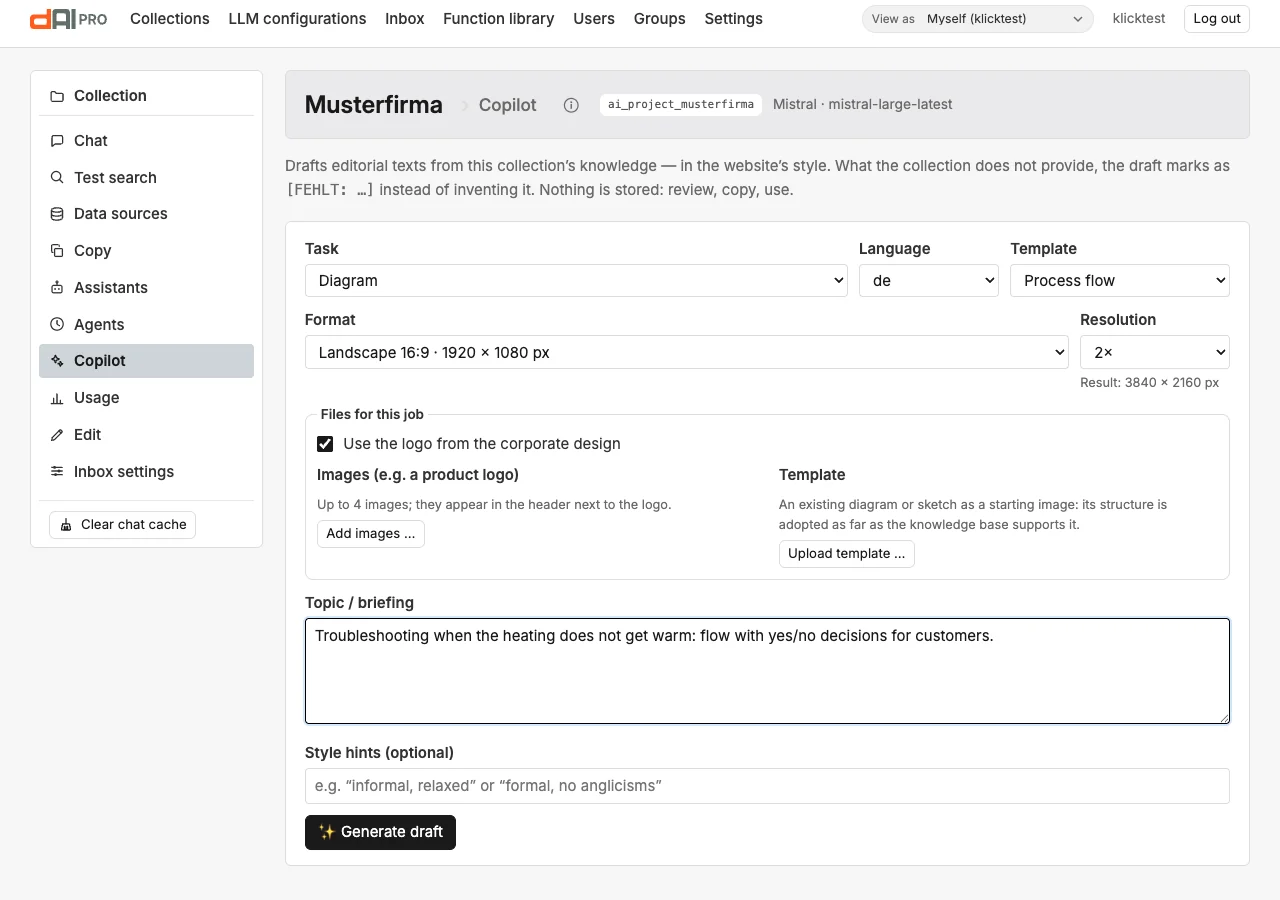
- Choose the task Diagram, the language, the Template, the Format and the Resolution (section “Formats and resolution”). Landscape 16:9 is suggested.
- Under Files for this job you decide whether the logo from the corporate design appears, and you can upload further images and a starting image (section “Files for a job”).
- Describe in the briefing what the diagram should show, for instance “the annual heating maintenance”. Here the Style notes affect the tone and length of the texts, for example “short keywords”.
- Click Generate draft.
| Template | Content |
|---|---|
| Process flow | 2 to 8 stations in a straight sequence, vertical or horizontal, each with a short explanation. With yes/no decisions up to 10 entries, then always vertical (see “Flows with decisions” below). |
| Step-by-step guide | 2 to 8 numbered steps with text. |
| Comparison table | 2 to 4 columns for the compared offers, up to 8 rows of features. |
| Timeline | 2 to 8 events with date and label. |
| Hierarchy | One root with up to 6 branches, up to 5 sub-items per branch. |
| Key figures | 1 to 6 tiles with value, unit and label. |
How a diagram is made. As with illustrations, the Copilot searches the collection using only the content part of the briefing. From the matches the collection's chat model supplies the structure: title, entries, caption and alt text. For the entries it gives the number of the match they come from; in the diagram this number appears as a superscript. Anything missing is listed under Not covered by the collection. The template designs the structure in the collection's corporate design (Chapter 4), with its colours, the uploaded font files and the logo at the top right; images of the job stand next to it. A browser on the server takes a picture of the result in exactly the chosen size. Not a single pixel comes from the model, which is why labels, colours and number of elements are exact. The Copilot ignores design wishes in the briefing such as colours or background; the template determines the design.
Flows with decisions. The Process flow template also draws branches. A station can be a decision; it appears as a diamond with a question. The main answer leads to the next station; unless stated otherwise it is “Yes”. The other answer, usually “No”, leads into a side path with up to three stations and continues from there:
| Target after the side path | Effect |
|---|---|
| An earlier station | Loop: the flow repeats from there. |
| A later station | Jump: the stations in between are skipped. |
| The next station | The side path rejoins the main path. |
| End | The side path ends at an end marker, with its own label if desired. |
A flow has at most three decisions. As soon as decisions occur, the main path may have up to 10 entries, diamonds included, and all side paths together up to 6 stations. Such flows are always vertical: the main path on the left, the side paths on the right, the lines of the jumps in between. The answers appear in the language of the diagram, for instance “Ja” and “Nein” or “Yes” and “No”; if other short answers fit better, the language model sets them. It only sets a decision when the collection states the condition explicitly, for instance “If the display does not light up, …”. Otherwise the flow stays a straight sequence. If the language model delivers an invalid structure, for instance a jump to a station that does not exist, the Copilot asks once more and otherwise reports an error.
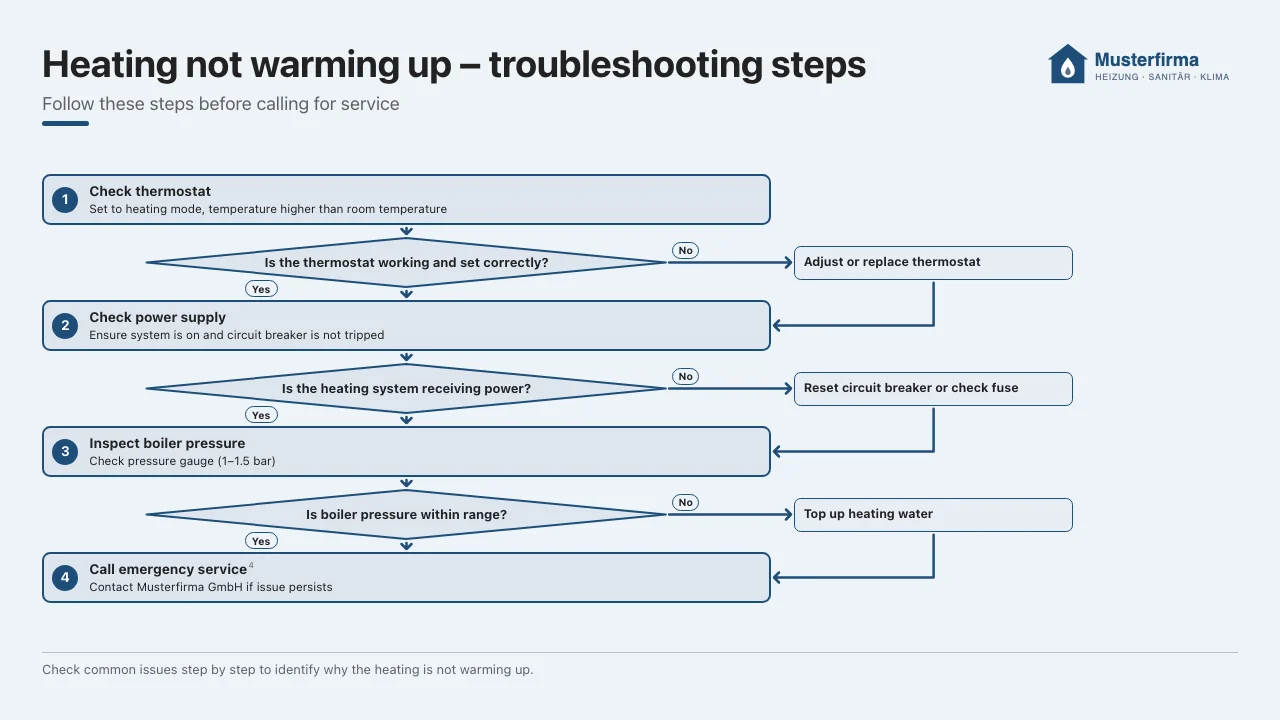
Result. As with illustrations, you see the preview, alt text and caption for copying, plus gaps and sources. Instead of the prompt, the collapsible section shows Structure used, the entries the template built the image from. Keep, Download WebP, Download PNG, Discard and Regenerate with hint work as with illustrations; a new run keeps template, format and resolution. Diagrams also appear in the list Recently generated. There is no self-check here, because the template draws exactly. A diagram costs only the call to the chat model; under “Usage” it appears with the purpose “Copilot” (Chapter 19).
Limits. The Process flow template does not draw more than three decisions, decisions within a side path or branches that run in parallel. Split such processes into several diagrams. Like every task, a diagram knows only what is in the collection. Anything missing appears as a gap and is not made up.
Marking. Diagrams also carry the machine-readable AI marking, here with the IPTC value compositeWithTrainedAlgorithmicMedia: the graphic comes from the template, the content from the language model (Chapter 22). If the checkbox for the caption is ticked in the corporate design (Chapter 4), the Copilot adds “Diagram created with AI assistance.” to the caption.
Documents
The task Document (PDF and Word) turns the knowledge of the collection into a finished document: a guide, a data sheet, an FAQ, a fact sheet or a report. It is created twice, as a PDF and as a Word file, in the corporate design and on the collection's letterhead (Chapter 4). Citations appear in the text, the sources at the end.
Prerequisite. Documents do not need an image model, but they need the render service from version 1.1.0, which can set PDFs and turn PDF pages into images (Chapter 26). If it is missing or older, the Copilot shows the note “Documents need the render service with PDF support” for the task Document (PDF and Word), and the button stays disabled.
How to use it.
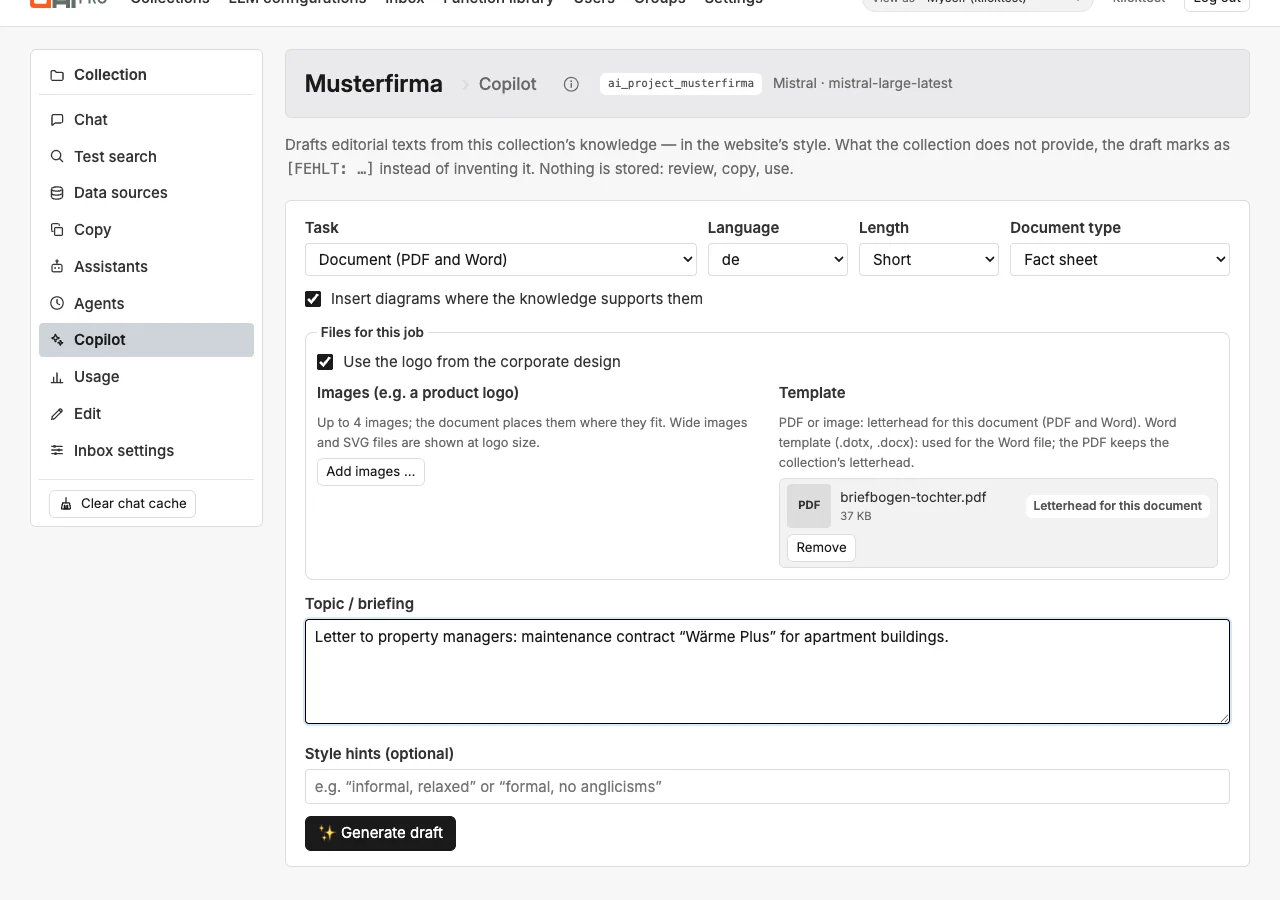
- Choose the task Document (PDF and Word), the language and the Document type.
- Choose the Length: Short, Medium or Long, that is about 350, 750 or 1,400 words.
- Leave the checkbox Insert diagrams where the knowledge supports them ticked if the document may show flows, comparisons or key figures as graphics. The Copilot then inserts up to two diagrams. The checkbox only appears when diagrams are available.
- Under Include images you choose existing illustrations and diagrams from “Recently generated”, up to six. The selection only appears if the collection has such images.
- Under Files for this job you can upload further images, for instance a product logo, and a template for this document only: a PDF or image as letterhead, or a Word template. The checkbox Use the logo from the corporate design decides whether the logo appears above the title when there is no letterhead (section “Files for a job”).
- Describe in the briefing what the document is about and who it is for. The Style notes affect the tone and length of the text.
- Click Generate draft.
| Document type | Structure |
|---|---|
| Guide | Introduction, prerequisites, numbered steps per task, notes and warnings; at the end a table with problem, cause and solution if the collection provides it. |
| Data sheet | Short description, features, technical data as a table, plus areas of use, scope of delivery or contact as far as the collection names them. |
| FAQ | Topic sections with questions and brief answers, only questions the collection answers. |
| Fact sheet | One page: key message, the most important points, a note, a small table if needed. |
| Report | Summary first, sections with the findings, figures as a table, conclusion. |
What happens during generation.
- Search. As with images, the Copilot searches the collection using only the content part of the briefing. It fetches more excerpts than for a page text and uses up to ten sources.
- Text. The collection's chat model writes the title, subtitle, the list of gaps, the requests for diagrams and the text. It backs factual statements with the number of their match. Anything missing appears in the text as
[MISSING: …]. - Diagrams. For each request the Copilot creates a diagram from the templates (section “Diagrams”), with the same matches. In the document it appears without its own logo, with the caption below the image. If a diagram fails, it is left out and the check report gives the reason.
- Images. The Copilot places the selected illustrations and diagrams and the uploaded images where they fit. Anything it does not place goes to the end of the document. Wide images and SVG files, usually logos, are at most 60 mm wide.
- Typesetting. The render service sets the PDF with the letterhead as underlay, and dAI Pro writes the Word file. Both carry colours, fonts and margins from the corporate design. Citations appear as superscript numbers and refer to the list of sources at the end. Gaps are highlighted in yellow in the PDF.
- Marking. dAI Pro writes the AI marking into both files and reads it back before delivery. If it is missing, generation stops (Chapter 22).
- Preview. The first three pages of the PDF appear as images.
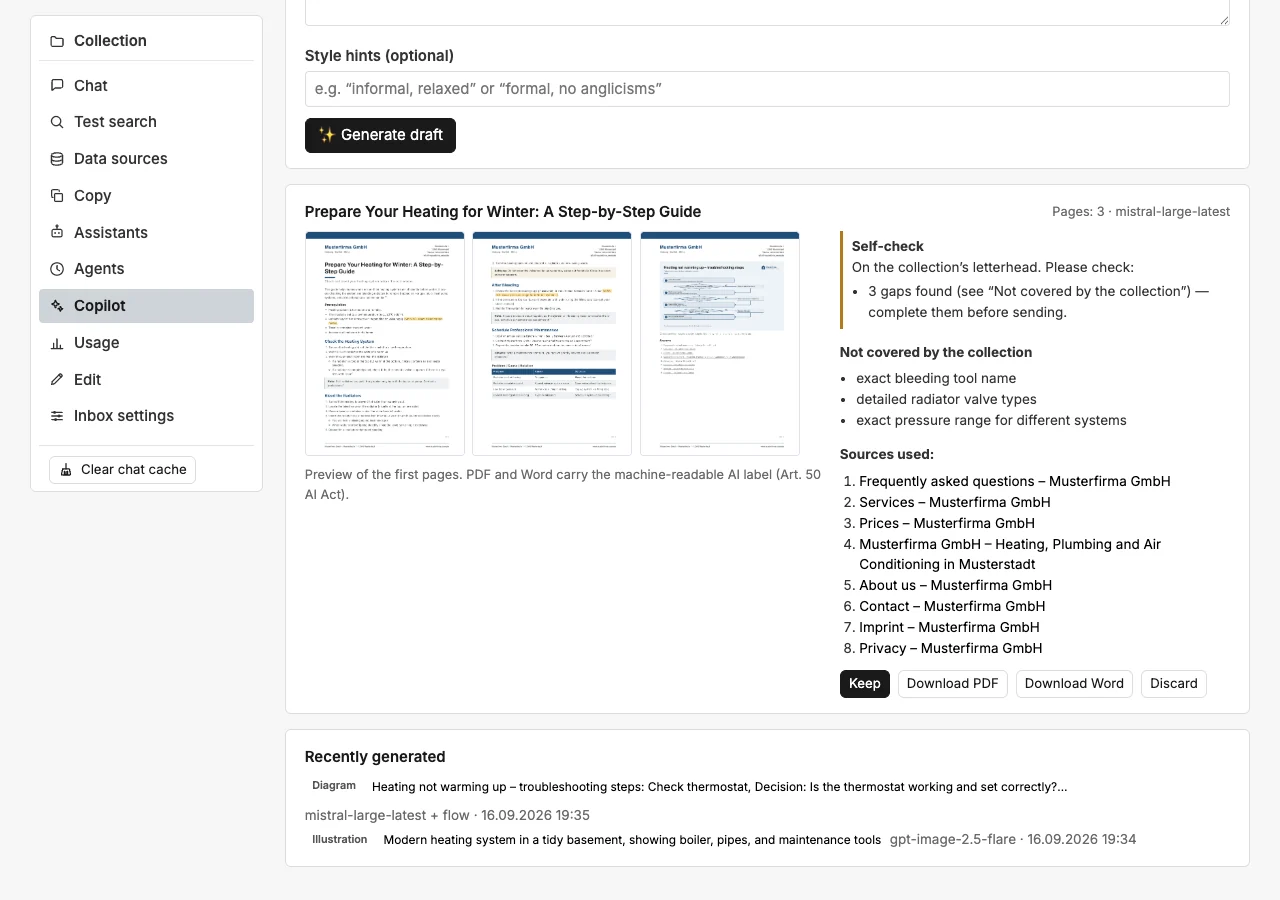
Result. Above the preview you see title, number of pages and model. Next to it the Self-check box shows the check report: Passed or Deviations remain, plus whether the collection's letterhead or the job's letterhead was used, which Word template applied and how many diagrams were inserted. As deviations it lists how many gaps are marked in the text, which letterhead file could not be used and which diagram could not be created. Below follow the gaps and the sources. Plus the buttons:
| Button | Effect |
|---|---|
| Keep | Marks the document as kept. It stays in the list “Recently generated” and is not cleaned up. |
| Download PDF, Download Word | Downloads the file with the AI marking. |
| Discard | Deletes the document together with its files. |
As with images, interim results that are neither kept nor discarded are cleaned up after one day. There is no new run with a hint for documents: change the briefing or the style notes and generate again. Gaps are best closed in the collection; then generate the document once more.
Text drafts as documents. Next to every text draft, for instance a page text or a summary, there is the button As PDF and Word. It sets the finished draft as a document with letterhead, corporate design and list of sources, without asking the language model again. If the draft starts with a single heading, it becomes the title. The result appears as described above.
Page layout. Documents are A4. Letterhead, page numbers and margins are set in the collection's corporate design (Chapter 4). Without a letterhead, the logo appears at the top right above the title and standard margins apply. With a letterhead, dAI Pro adds no extra logo, because the letterhead already carries it. Notes appear in the secondary colour of the corporate design, warnings in amber, in the PDF as in Word.
Word file. If a Word template is stored in the corporate design, the Word file is created in that template: headings, body text, tables, headers and footers and page margins come from the template, the template's placeholder text is dropped, and the check report says “Word uses the collection's template”. If a style is missing, dAI Pro adds its own. Without a template, Word receives colours, font names, margins, letterhead and page numbers, but no embedded fonts. If the font from the corporate design is not installed on the computer, Word replaces it. The letterhead lies as an image behind the text in the header. Word only knows page margins per section, not per page: the top margin of the following pages applies to all pages, and the first page gets the difference as spacing before the first paragraph. Left, right and bottom take the larger value of the first and the following pages. The page numbers are fields in the footer and keep counting while you edit.
Costs. A document costs one call to the chat model with more context than a page text, plus at least one further call per diagram. Under “Usage” they appear with the purpose “Copilot” (Chapter 19). A document does not call an image model; selected images have already been paid for. As PDF and Word costs no call.
Limits. From a Word template dAI Pro takes only the last section; a cover page section is dropped, and lists use dAI Pro's own numbering. Like every task, a document knows only what is in the collection and does not replace a review before sending.
Formats and resolution
Illustrations and diagrams are created in a selectable Format. These standard formats are available:
| Format | Size at 1× |
|---|---|
| Square 1:1 | 1080 × 1080 px |
| Landscape 16:9 | 1920 × 1080 px |
| Landscape 4:3 | 1600 × 1200 px |
| Landscape 3:2 | 1800 × 1200 px |
| Portrait 3:4 | 1200 × 1600 px |
| Portrait 2:3 | 1200 × 1800 px |
| Portrait 4:5 (social post) | 1080 × 1350 px |
| Story 9:16 | 1080 × 1920 px |
| Link preview image | 1200 × 630 px |
| Ultra-wide 21:9 | 2520 × 1080 px |
| Banner 3:1 | 1800 × 600 px |
| Banner 4:1 (LinkedIn cover) | 1584 × 396 px |
| A4 portrait | 1240 × 1754 px |
| A4 landscape | 1754 × 1240 px |
Custom size (pixels). Enter width and height, each 64 to 4,096 pixels. The long side may be at most four times the short side.
Resolution. 1×, 2×, 3× or 4× multiplies the size; landscape 16:9 at 2×, for example, becomes 3840 × 2160 pixels. Below the field you see the size of the finished image. More than 8,192 pixels per side or 40 megapixels is not possible; levels that would be too large are disabled. A4 portrait has about 200 dpi at 2× and about 300 dpi at 3×, enough for print.
How the format is produced. The render service draws diagrams in exactly the chosen size. Image models only deliver certain sizes: dAI Pro orders the closest one, with Gemini in the required resolution tier 1K, 2K or 4K, crops the image centrally to the format and brings it to the chosen size. OpenAI delivers at most 3,840 pixels on the long side, Gemini up to about 5,500 pixels in the 4K tier. If the format needs more, dAI Pro enlarges the image, and the Self-check box states the factor. An enlarged image has less detail than its size suggests.
Costs. Larger images cost more with both providers (Chapter 19). For web pages 1× is usually enough; higher levels pay off for print and large screens. A diagram costs the same in every size, but at 4× it takes a few seconds longer.
Files for a job
For illustrations, diagrams and documents the Copilot shows the section Files for this job. There you upload files that apply only to this job and do not belong to the corporate design: a product logo, a sketch or a letterhead for a single letter.
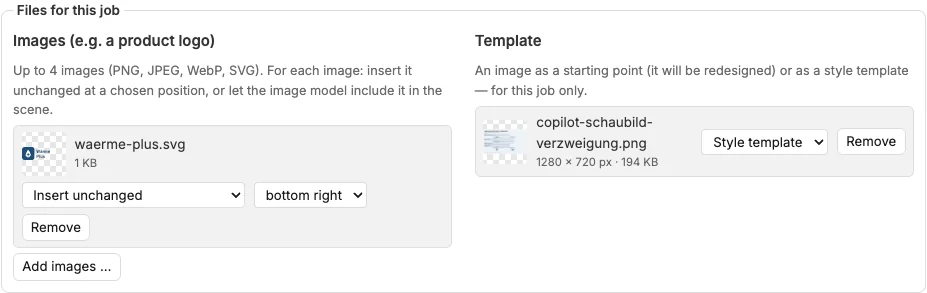
Images. Up to four images as PNG, JPEG, WebP or SVG, each at most 10 MB. What happens to them depends on the task:
| Task | Effect |
|---|---|
| Illustration, Insert unchanged | After generation dAI Pro places the image pixel-exact at the chosen position: top left, top right, bottom left, bottom right or centre. The image model keeps this area calm. Several images at the same position stand side by side. |
| Illustration, Let the image model include it | The image goes to the image model as a template, and the model builds it into the scene, for instance on a screen or a sign. The self-check verifies that it is visible and unaltered. |
| Diagram | The images appear in the header to the right of the logo from the corporate design. |
| Document | The Copilot places the images where they fit. Wide images and SVG files appear at logo size, at most 60 mm wide. |
Image models do not always reproduce lettering exactly. For a logo that must be exact, choose Insert unchanged.

Use the logo from the corporate design. For diagrams and documents this checkbox decides whether the collection's logo appears. It is ticked. Uploaded images are added to the logo, they do not replace it. A document on a letterhead never carries an additional logo.
Template. One file, at most 10 MB. For illustrations you choose how it works; for diagrams and documents the role is fixed:
| Task | Role | Effect |
|---|---|---|
| Illustration | Starting image | The image model redesigns the image and keeps its layout. The briefing describes what should change. |
| Illustration | Style template | For this job only, the image sets colour, lines and level of detail and replaces the reference images of the corporate design. |
| Diagram | Starting image | The chat model reads type, order and structure from the image, for instance a sketch or an old diagram, and adopts them as far as the collection supports them. Facts still come only from the collection. |
| Document | Letterhead (PDF or image) | Replaces the collection's letterhead in PDF and Word. The collection's Word template is then not used, because it brings its own letterhead. |
| Document | Word template (.dotx, .docx) | The Word file is created in this template. The PDF keeps the collection's letterhead. |
For illustrations and diagrams only images work as a template (PNG, JPEG, WebP). If a template does not fit the chosen task, for instance a Word template for an illustration, the Copilot marks it as unsuitable and leaves it out. If the chat model cannot read images, the diagram is created without the starting image, and the check report says so.
Checks and retention. dAI Pro checks the files on upload like the corporate design files: SVG files lose scripts and external references, Word templates with macros are rejected. The files are stored with the collection and deleted after one day. They apply to all jobs you start on the page until you remove them or leave the page. Remove deletes a file immediately. If a file has already been deleted when you generate, the Copilot reports “An uploaded file is no longer available”; upload it again.
Image models without image input. If the image model does not accept images, dAI Pro inserts images set to “Let the image model include it” unchanged at the bottom right and leaves templates out. The Self-check box says so.
What the Copilot does not do
- It does not invent facts, prices or dates. If it is not in the collection,
[MISSING: …]appears in the draft. - It publishes nothing and saves no texts. The draft lives only in your clipboard. Illustrations, diagrams and documents are the exception: they remain until you keep or discard them (section “Illustrations”).
- It does not replace a review. Numbers and names in the draft come from the indexed content, which may be out of date (Chapter 6).
Frequently asked questions
The draft is too general. Make the briefing more precise: name the page, the target group and the occasion. Style notes such as "formal address, no superlatives" help.
The draft contains many [MISSING] markers. The collection does not cover the topic. Either a page on it is missing, or the topic does not belong to this collection.
Can the Copilot write directly to the website? No, deliberately not. The draft passes through the hands of an editor.
The task “Illustration” only shows a note instead of the button. No image model is assigned to the collection. Enter an image-capable configuration in the settings under “Additional language models” (Chapter 4); if there is none, the administration creates one (Chapter 24).
The task “Diagram” or “Document” only shows a note about the render service. The render service is not running on the server, or it is not connected. For documents it also needs at least version 1.1.0. The administration sets it up or updates it (Chapter 26).
The illustration does not match the requested background exactly. With Gemini the image brief can only describe the background. For exact backgrounds and cut-out images you need an OpenAI configuration as the image model (Chapter 24).
How do we get our product logo into the image? Upload it under Files for this job. For illustrations choose “Insert unchanged” with a position if the logo must be exact, or “Let the image model include it” if it should be part of the scene (section “Files for a job”).
The included logo is distorted or misspelled. Image models redraw templates and do not always get lettering right. Choose “Insert unchanged”; dAI Pro then places the file into the image itself.
The chosen resolution is disabled. The image would be too large: more than 8,192 pixels per side or more than 40 megapixels. Choose a lower resolution or a smaller format (section “Formats and resolution”).
The self-check reports “Check not possible”. The chat model of the image configuration cannot read images, or the provider did not respond. The image is then unchecked, so check it yourself. The administration enters an image-capable chat model (Chapter 24).
Why does the text in the document not start directly below the logo? dAI Pro looks for the largest free area on the letterhead and keeps 5 mm away from everything printed on it. If there is an address block below the logo, the text starts only below it. Check this with Check letterhead in the corporate design and set the top margin by hand if needed (Chapter 4).
Can I upload a Word template (.dotx)? Yes, in the corporate design under “Word template” (Chapter 4). The Word files are then created in your template; the PDF keeps the letterhead. Templates with macros are rejected.
Why is my font missing in Word? Word does not embed fonts. If the font from the corporate design is not installed on the computer, Word replaces it with another one. Install the font, and it appears without any change to the file. The PDF always contains the font.
The check report says the letterhead file could not be used. Usually the PDF only opens with a password, or the file is damaged. Upload an unprotected version in the corporate design (Chapter 4). A PDF with mere permission protection works, but lies under the text as an image.
See also
- Chapter 4 · Setting up collections (image model, corporate design, letterhead)
- Chapter 6 · Documents
- Chapter 15 · Agents (free prompt for regular reports)
- Chapter 19 · Usage and costs (costs of images, self-check and documents)
- Chapter 22 · Accessibility and AI transparency (marking of generated images and documents)
- Chapter 24 · Configuring language models (image model)
- Chapter 26 · Operations (render service for diagrams and documents)
- Chapter 29 · REST API (files for a job, formats)