Manual · Chapter 11 · Part C Channels
Voice chat
Purpose
With the voice chat, visitors talk to the assistant instead of typing: press the microphone, speak the question, hear and read the answer. That helps on a smartphone, on the move, in the workshop, and anyone who finds typing difficult. The answers come from the same knowledge as in the text chat, with the same rules.
What visitors see and hear
- A microphone button next to the input field, as soon as the voice chat is switched on for the collection and the embed does not hide it.
- While speaking, the transcript appears live in the input field. A short pause ends the recording and sends the question.
- The answer is read aloud and shown as text at the same time, with sources as in the text chat. A tap on the stop button interrupts.
- Every answer has a speaker button that reads it aloud again later.
- While playing, "AI voice" appears next to the microphone button: the visible marking of the AI speech output under the EU AI Act; the machine-readable one lives in the control protocol (Chapter 22).
- The help text in the chat names the provider the recording is sent to.
Where
Open Edit → Voice chat in the collection's settings.
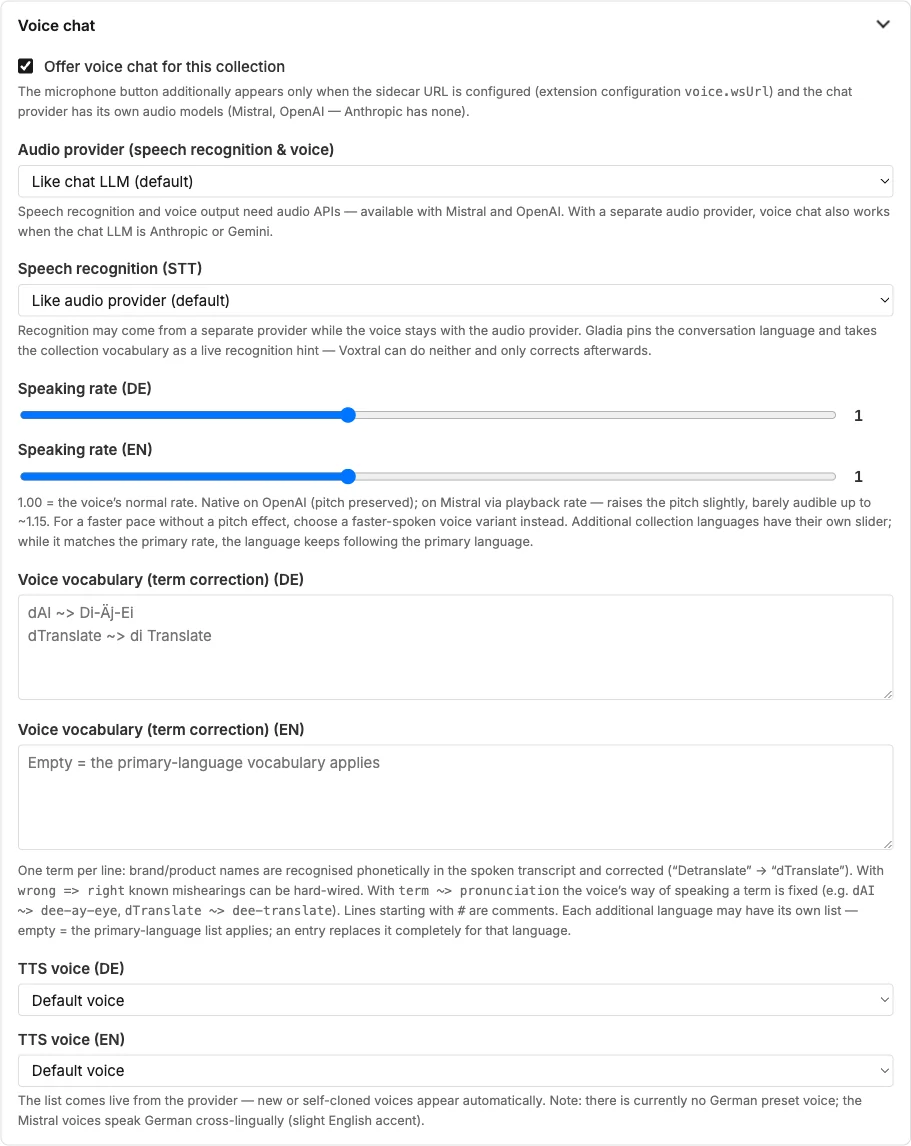
| Field | Meaning |
|---|---|
| Offer voice chat | Enables the microphone button. It appears only if the instance has set up the voice service (Chapter 26) and the chosen provider supports audio. |
| Audio provider | Speech recognition and voice need audio models. "Same as chat LLM" uses the collection's provider if it supports audio (Mistral, OpenAI). With a separate audio provider, the voice chat also works when the chat answers with Anthropic or Gemini. |
| Speech recognition (STT) | Recognition may be handled by a different provider than the voice. "Like audio provider (default)" lets the audio provider recognise speech itself — with Mistral via Voxtral. Gladia is supported as a pure recognition service: it locks the conversation language and uses the collection's vocabulary as a recognition aid. Whether you use it is your decision: check the provider's terms first (retention of recordings, sub-processors outside the EU) and conclude the data processing agreement; Dreistein itself does not use Gladia. |
| Speaking rate | 1.00 = normal rate. A separate slider for each additional language. |
| Voice vocabulary | One term per line: brand and product names are recognised and corrected in the transcript. wrong => right hard-wires known mishearings. A separate list per language; empty = the list of the primary language. |
| TTS voice | The list comes live from the provider; voices you have cloned yourself appear too. |
Voice and rate appear only after a speech-capable audio provider has been chosen and saved.
Data protection
The recording goes to the chosen provider for recognition; the answer is converted to speech there. The help text in the chat names the provider and its region; the collection's processing region (Chapter 20) also checks the audio providers. Recordings are not stored.
Frequently asked questions
The microphone button is missing. Three possible reasons: the voice chat is off in the collection; the embed hides "Microphone" under "Functions"; the instance's voice service is not running.
The voice speaks German with an accent. Not every provider has a German voice; some speak German with an English colouring. Try the voices in the list, or choose a different audio provider.
The chat does not understand our product name. Enter it in the voice vocabulary, with the spelling that arrives in the transcript: product name wrong => product name right.
See also
- Chapter 8 · Embedding the chat (function "Microphone")
- Chapter 20 · Processing region and sovereignty
- Chapter 26 · Operations (voice service)