Manual · Chapter 17 · Part D Day-to-day operation
Support inbox
Purpose
The inbox is where requests arrive that no chat resolves: handovers from the chat, emails from a support mailbox, cases from the ticket system, form submissions. For every case dAI Pro drafts a substantiated reply from the knowledge of the responsible collection. Checking, adjusting and sending remains a human step. The inbox is not a helpdesk for everything but the one inbox for whatever can be answered from the knowledge.
Where
Inbox in the top bar, across all collections. On the left the list of cases with filters, on the right the opened case.
At the top is the tally of the mailbox: new, without collection, mine, in progress, waiting for customer, and the share of cases that could have been resolved from the knowledge alone.
| Filter | Meaning |
|---|---|
| New | Nobody has touched the case yet. |
| Without collection | The agent could not assign a collection unambiguously; someone has to choose. |
| My tickets | Cases assigned to me. |
| In progress, Waiting for customer, Done, Discarded | The states of the case. |
Create case creates a case by hand, for instance after a phone call; New entry writes a verified reply directly into the support database of the collection (see below).
A case
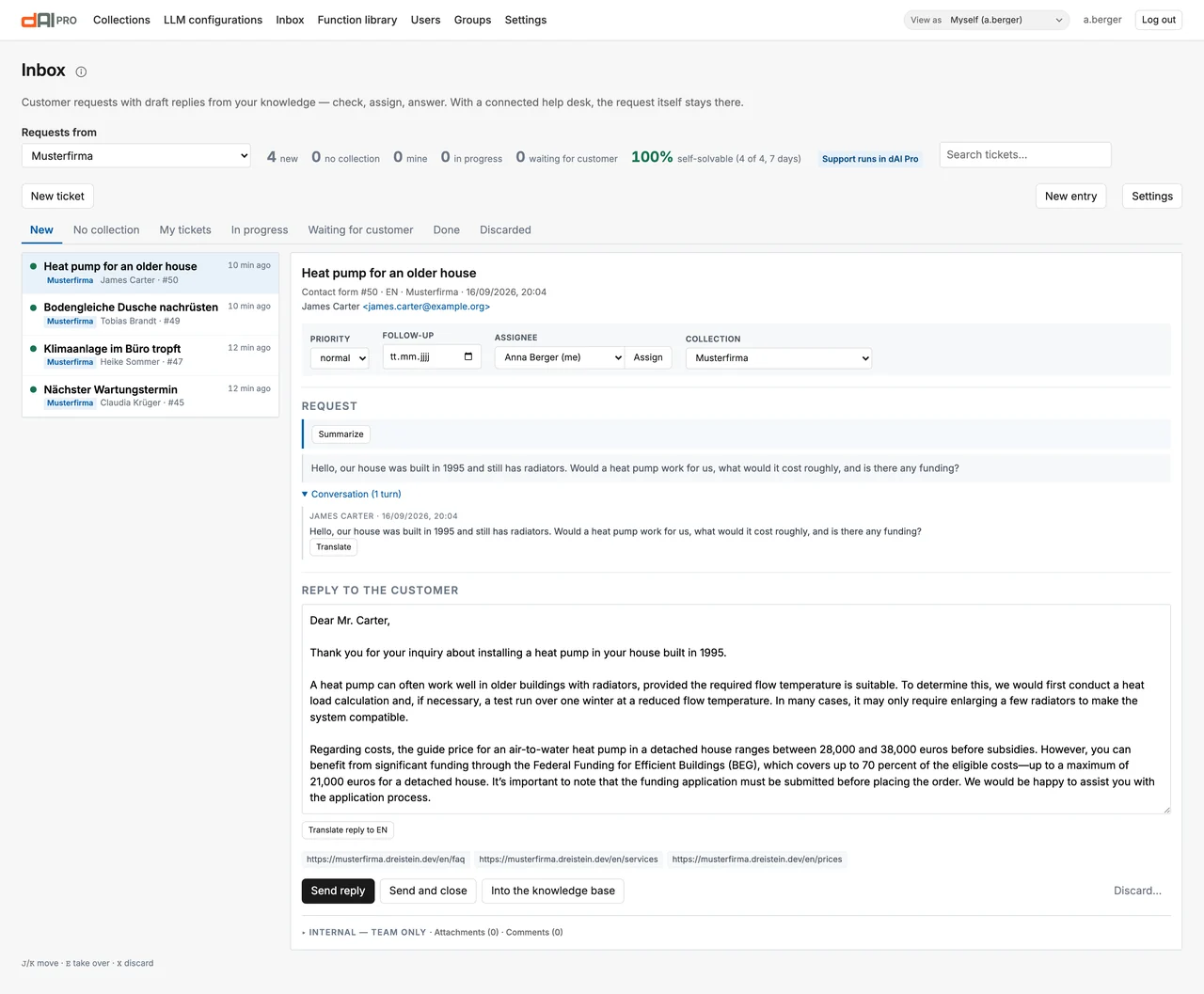
| Element | Meaning |
|---|---|
| Summary | The agent summarises the request in two or three sentences and classifies urgency and tone. "Update summary" after new messages. |
| Conversation history | All messages of the case, including the chat history for handovers from the chat. |
| Collection | Which collection supplies the knowledge. The agent suggests it; if the assignment is unclear, you choose. |
| Assign | To a person in the team. |
| Urgency | Normal or urgent, taken from the classification or set by hand. |
| Reply to the customer | The agent's draft, with references from the collection. You edit it freely; text blocks can be inserted, and the reply translated into the customer's language. |
| Follow-up | A date on which the case comes back to the top. |
| Attachments, comments | Files for the case and internal notes the customer does not see. |
| Send reply, Send and close | Sends by email from within the case; the customer's reply lands in the same case again. |
Every sent reply carries a status link under which the customer can see, without signing in, where their request stands.
Channels into the inbox
| Channel | Setup |
|---|---|
| Chat handover | Automatic as soon as human handover is active (Chapter 12). |
| Support mailbox | IMAP access in the settings of the collection (Chapter 12) or of the inbox; the "Inbox" agent fetches the emails at the configured interval. |
| Ticket system | "Use as inbox" in the actions of the collection, for Zammad, Freshdesk and Zendesk (Chapter 12). The draft goes into the ticket as an internal note or waits here for approval. Whatever is answered or closed there is mirrored here; if a ticket reopens or the customer writes again after the reply, the case is back under "In progress". After switching the ticket system, the agent fetches its open tickets as on the first run. |
| Forms | In TYPO3 via the finisher of the form framework; in the standalone version via the REST API (Chapter 29). |
| By hand | "Create case". |
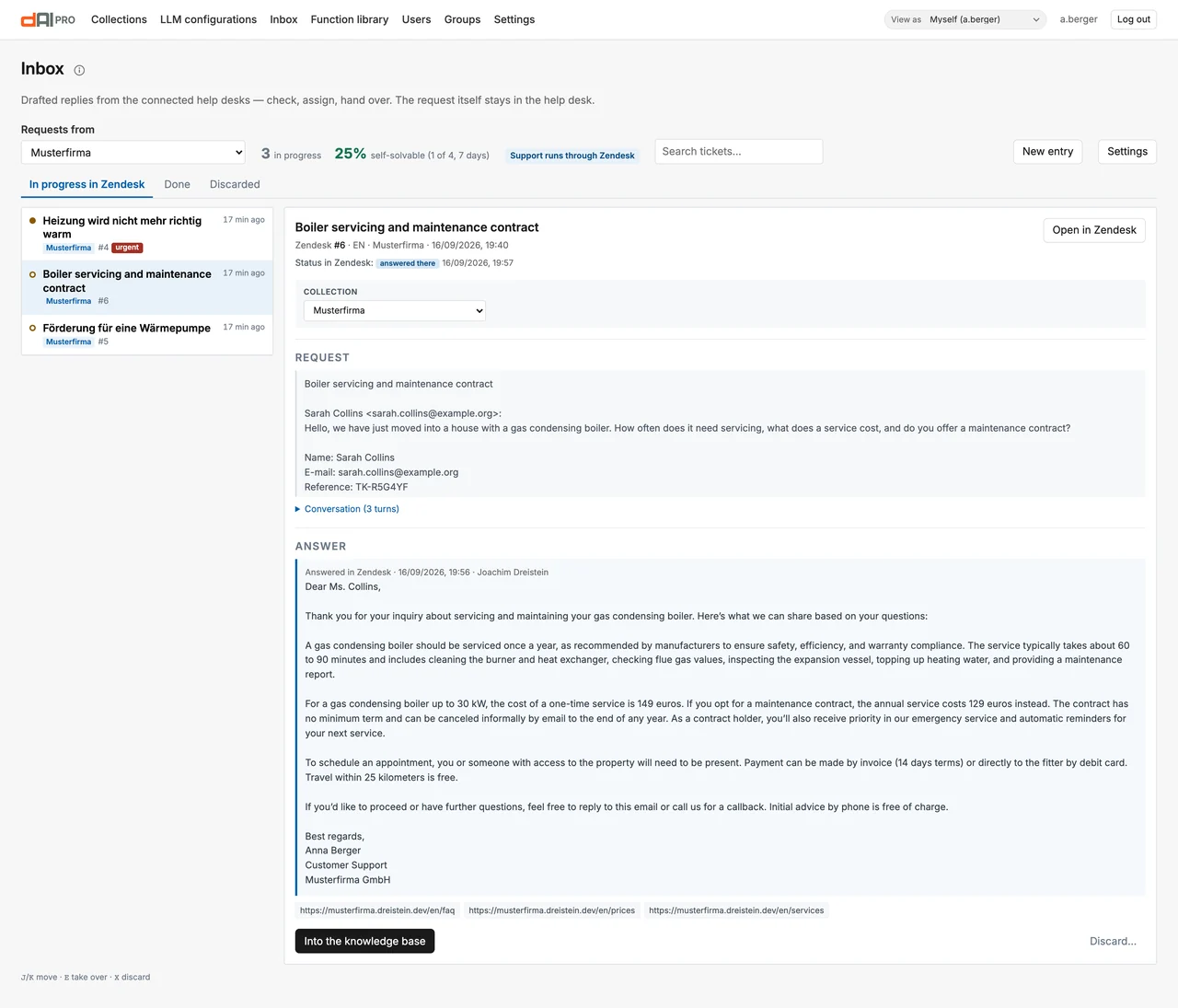
With a ticket system connected, the inbox only shows the tabs that would not duplicate it: "In progress in …", "Done" and "Discarded". At the top it says which system the support runs through; the case shows its status in the ticket system and "Open in …". The reply the customer received there appears in the history and can be added to knowledge.
The inbox settings
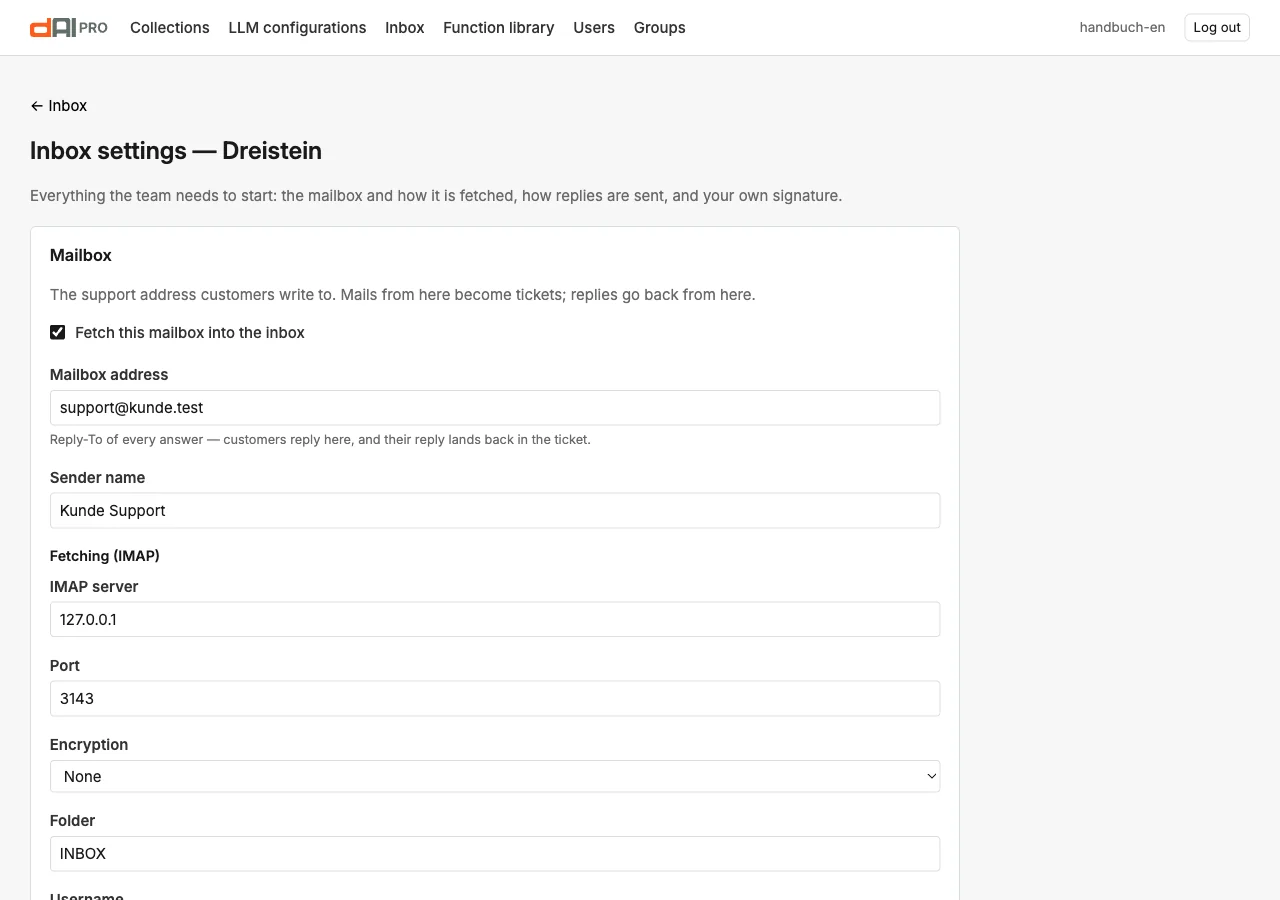
| Section | Content |
|---|---|
| Mailbox, fetching, sending | IMAP access, fetch interval, sources besides the mailbox, sender and team signature. |
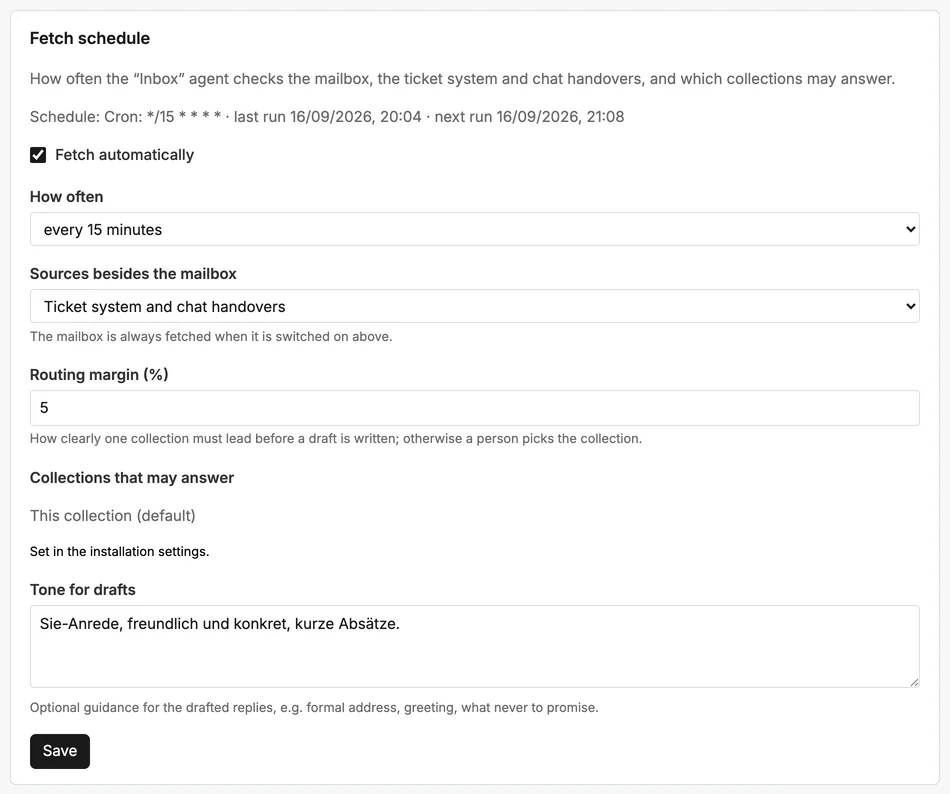
| Assign automatically | Which collections are eligible and how clearly one of them must lead ("Routing margin" in percentage points, default 5) for the agent to assign on its own; otherwise the case stays "without collection". Tone of the drafts. In the "Operation" section also rules that assign new cases to a person by collection or language. |
| Notifications to the team | Slack message on a new case, on cases without collection and when a customer replies to a case without a responsible person. |
| Text blocks | Recurring paragraphs per language, insertable in the case with one click. |
| Operation | Status link in every reply, deletion periods for completed cases, automatic closing when the customer does not reply, urgency and tone from the AI classification. |
| Weekly report | The week's tally by email to the named addresses. |
| Access and erasure (GDPR) | Show or delete all cases for an email address. |
| Migration from the ticket system | Take over existing cases from Zammad, Freshdesk or Zendesk once. |
| My notifications, My signature | Per person: email on assignment and customer reply, own signature. |
Roles
Who may work in the inbox is defined by users and groups (Chapter 25): editors see and answer cases, moderators may additionally assign, discard and change settings.
The support database
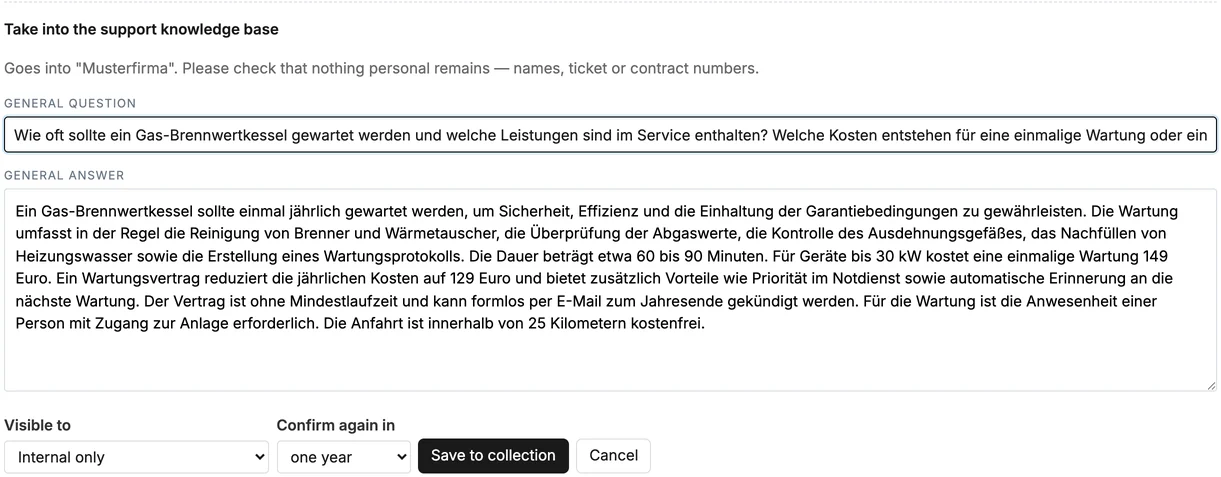
A verified reply is knowledge. After sending, the reply can be added to knowledge from within the case: it becomes a document of the collection in the data source "Support database" (Chapter 5). Next time the chat answers the question itself and names "our support database" as the source, without a link, because there is no public page. New entry creates such a reply directly, without a case.
When adding, dAI Pro writes a general question and answer without names or case numbers; a signature is left out. You choose whether the chatbot may answer with it or the entry stays internal, and when it should be confirmed again (three months, six months, one year or no reminder).
Frequently asked questions
The draft is wrong. It comes from the knowledge of the collection. Check the references in the draft; if the knowledge is missing, reply by hand and add the reply to the support database.
A case stays permanently "without collection". The confidence is not sufficient, or the matching collection is not selected under "Assign automatically". Choose the collection in the case.
Does the customer see the comments? No. Comments are internal. The customer sees only sent replies and the status link.
See also
- Chapter 5 · Data sources (support database)
- Chapter 12 · Human handover and actions
- Chapter 15 · Agents (inbox, ticket assistant)
- Chapter 25 · Users, groups, roles