Manual · Chapter 7 · Part B Knowledge
Good answers
Purpose
The quality of the answers decides whether visitors trust the chat. dAI Pro uses the knowledge rule to make sure that no answer is invented. Everything else, tone, precision, completeness, you control through a dozen settings and, above all, through the content itself. This chapter shows which lever is there for what, and what to do when an answer isn’t right.
The knowledge rule
The language model may only answer from the chunks that dAI Pro hands it along with the question. If the answer isn’t in them, the chat says so openly and, if set up, offers the way to a human. This rule stands above everything you write in the main prompt; a prompt cannot override it.
The consequence: a wrong answer almost always has a wrong or missing passage in the content as its cause. The path to a better answer therefore usually leads through the content, not through the settings.
The main prompt
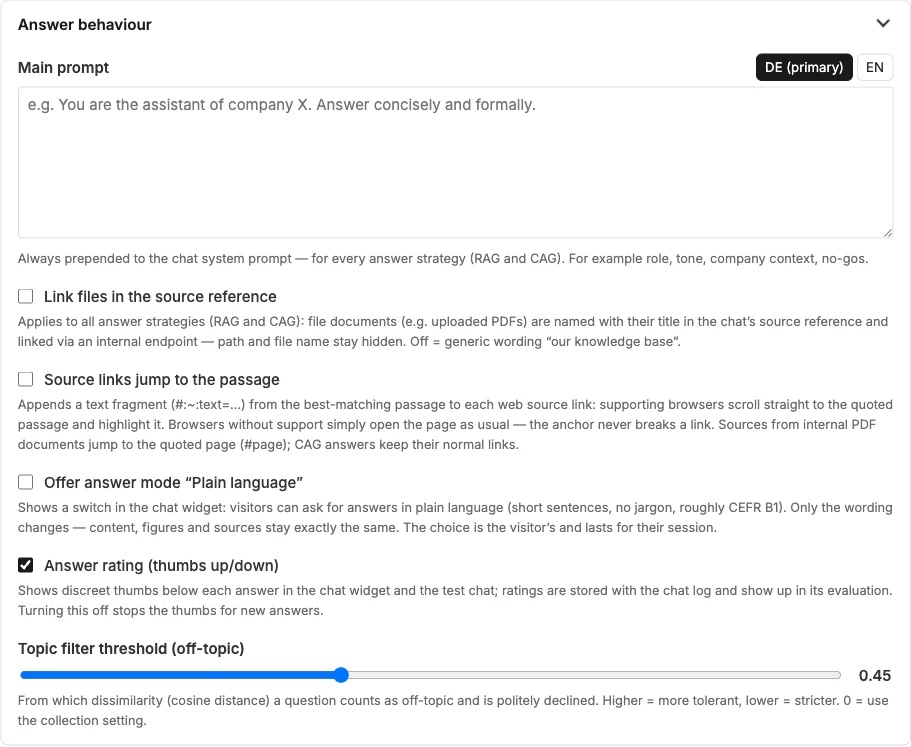
The main prompt (Chapter 4) is prepended to every conversation. It defines who is speaking and how. What belongs in it:
- Role and company: “You are the service assistant of Musterfirma GmbH, a master craftsman’s business for heating, plumbing and air conditioning in Musterstadt.”
- Tone and form of address: concise, friendly, formal address.
- Handling of figures: “Prices are guide values; a quotation follows after the on-site appointment.”
- No-gos: “No diagnoses when there is a smell of gas; refer immediately to the emergency service and the gas supplier.”
What doesn’t belong in it: facts. Opening hours or prices in the prompt are outdated tomorrow and contradict the website. Facts belong in a data source, for example one of type “Input”.
There is one tab per language. An empty tab uses the version of the primary language; the model still answers in the visitor’s language.
Sources and passages
| Setting | Effect |
|---|---|
| Sources (chat configurator) | Shows below the answer which pages it comes from. Almost always on for public chats. |
| Source links jump to the passage | The link opens the page at the cited passage and highlights it. For PDFs, the page. |
| Link files in the source reference | PDFs and other files are named with their title and linked via an internal endpoint; otherwise it just says “our knowledge base”. |
Topic filter
The topic filter threshold defines from which point a question counts as off-topic. The chat politely declines off-topic questions instead of straining the knowledge rule. A higher value lets more through. Change the value in small steps and check with five typical and five far-fetched questions.
Plain language and rating
Plain language offers visitors a switch for short sentences without technical terms. Content, figures and sources remain exactly the same. For websites with a mixed audience this is always worthwhile.
Answer rating shows thumbs below every answer. The ratings end up in the log (Chapter 16). A thumbs-down is the best hint as to where something is missing in the content.
The chat cache
dAI Pro remembers answers to identical questions so that frequent questions are answered quickly and cheaply. After a content change, the chat may therefore still give the old answer. Clear chat cache in the collection rail empties the store.
When an answer isn’t right
- Check the source. Open the source below the answer. Does it really say what the chat says? Then the content is the problem.
- Check the content. Is the page up to date? Do two pages contradict each other? Is the information missing entirely? Change the page, or enter the information in a data source of type “Input”.
- Re-index. “Check for changes”, or select the document and process it (Chapter 6).
- Clear the cache. Otherwise the old answer remains.
- If the question recurs in a different form, create a question–answer pair in the assistant (Chapter 10). It takes precedence over the search in the content.
- Have it checked. A golden-set agent asks the question afresh on every run and reports when the answer gets worse (Chapter 15).
See also
- Chapter 4 · Setting up collections
- Chapter 6 · Documents
- Chapter 10 · Assistants
- Chapter 16 · Quality cockpit