Manual · Chapter 4 · Part B Knowledge
Setting up collections
Purpose
The settings of the collection determine which language model answers, how it answers, what visitors may do and which paths lead out of the chat. Changes affect all channels of the collection: chat, search, assistants, agents.
Where
Open Edit in the collection rail. The page is divided into nine sections; on the first visit only “Basics” is open. All changes take effect after Save at the end of the page.
Changes to languages and language models affect subsequent indexing runs. Content that is already indexed is retained.
Basics
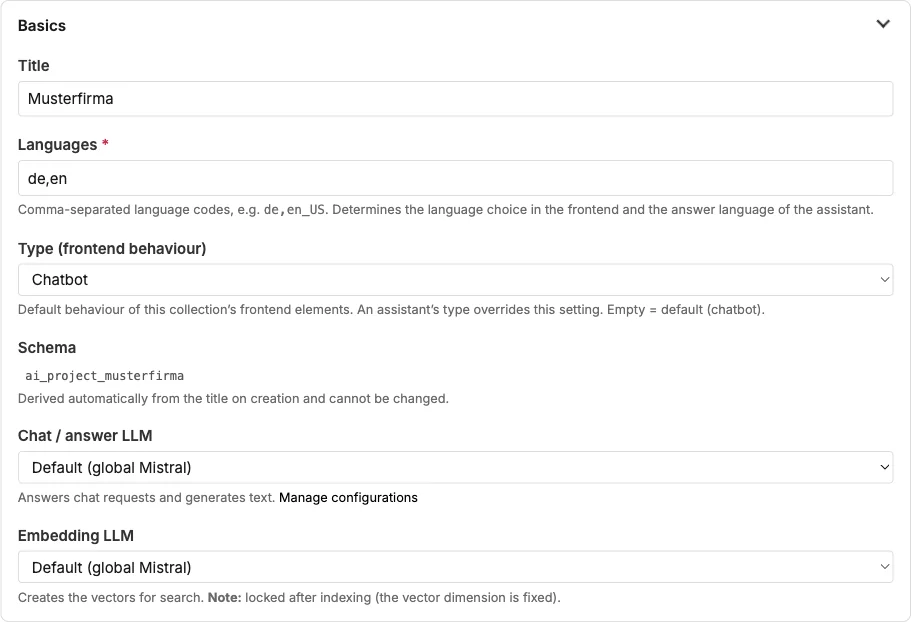
| Field | Meaning |
|---|---|
| Title | Name of the collection in lists and the header. |
| Languages | Language codes separated by commas, for example de,en. Determines the language selection in the chat, the answer language and the language tabs of all texts. |
| Type (frontend behaviour) | Default behaviour of the embeds: chatbot or website search. The type of an assistant overrides this setting. |
| Schema | The technical name of the collection, derived from the title on creation, cannot be changed. |
| Chat / answer LLM | The language model that answers chat requests and generates texts. The choice comes from the LLM configurations (Chapter 24). |
| Embedding LLM | The model that creates the vectors for the index. Locked after indexing because the vector dimension is fixed. |
If the collection is still on the global default without stored access credentials, a notice appears here: the chat then does not answer, and no index is created.
Additional language models and processing region
| Field | Meaning |
|---|---|
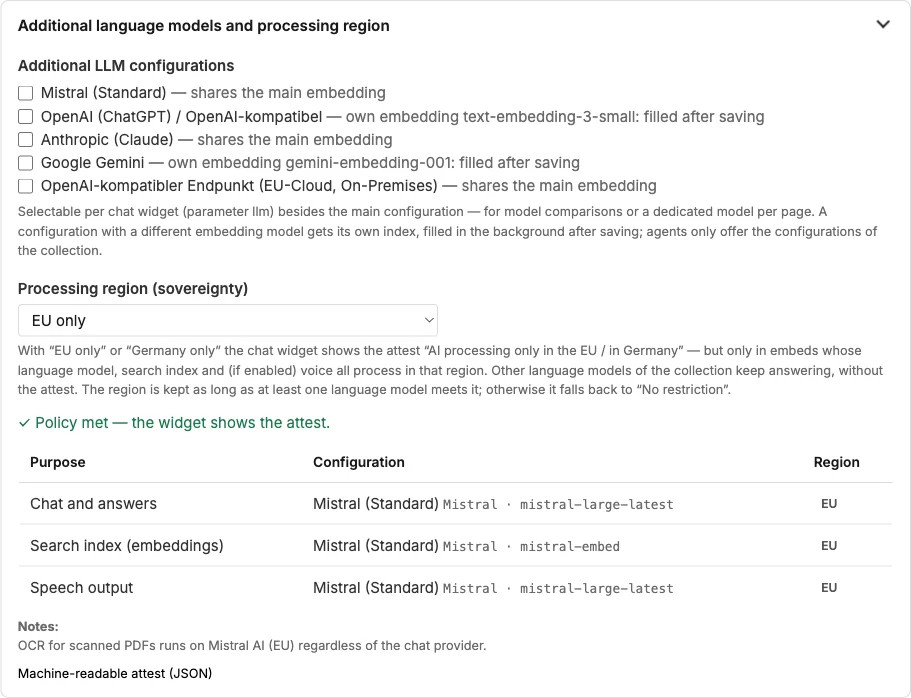
| Additional LLM configurations | Additional models that can be chosen per embed: for model comparisons or a model of its own per page. A model with a different embedding gets an index of its own, which is built in the background after saving. |
| Processing region | “EU only” or “Germany only”: the chat widget then shows the attest “AI processing only in the EU” or “in Germany”, but only in embeds whose language model, search index and voice process in this region. |
The table below shows, for each purpose (chat, embeddings, voice, speech recognition), the configuration used and its region. If the main configuration does not meet the region, the attest only appears in embeds with a suitable model. If no model meets the region, dAI Pro resets it to “No restriction” on saving and reports this. A link leads to the machine-readable attest. Chapter 20 goes deeper into the topic.
Image model (copilot illustrations). The configuration with which the editorial Copilot generates illustrations (Chapter 18). Only image-capable configurations are available, today OpenAI and Google Gemini; “None” means the Copilot offers no illustrations. There is no fallback to the chat model: which provider generates images and in which processing region remains your decision. The image model itself is set in the configuration (Chapter 24).
Monthly image limit. Maximum number of generated images per calendar month for this collection, 0 = unlimited. Once the limit is reached, the Copilot reports this and generates nothing until the next month. Every image costs money at the provider; the limit keeps the costs predictable (Chapter 19).
Answer behaviour
| Field | Meaning |
|---|---|
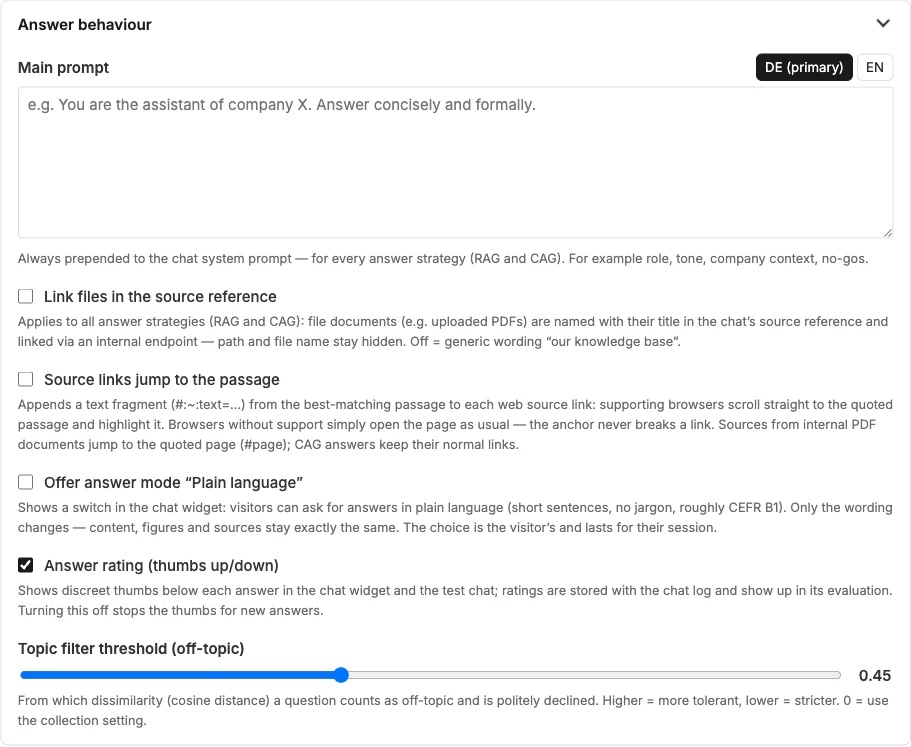
| Main prompt | Prepended to every conversation: role, tone, company context, no-gos. One tab per language. |
| Link files in the source reference | File documents such as PDFs appear in the source reference with their title and are linked via an internal endpoint; path and file name stay hidden. Off = generic mention “our knowledge base”. |
| Source links jump to the passage | Web sources get a text fragment appended: supporting browsers jump directly to the quoted passage when opening. PDF sources jump to the page. |
| Offer answer mode “Plain language” | Shows a toggle in the chat for answers in plain language. Only the wording changes; content and sources stay the same. |
| Answer rating | Thumbs below every answer. Ratings land in the log and in its evaluation (Chapter 16). |
| Topic filter threshold | From which dissimilarity a question counts as off-topic and is politely declined. Higher = more tolerant. |
Chapter 7 explains how these fields together determine the quality of the answers.
CAG configuration
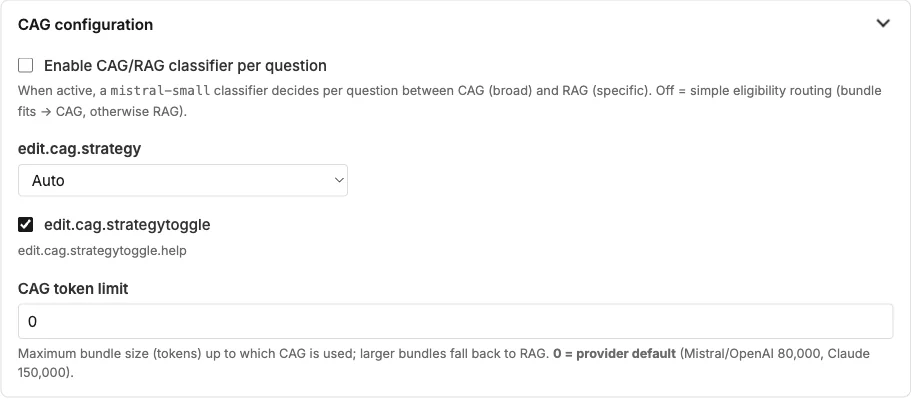
dAI Pro knows two ways to an answer. RAG searches the index for the matching sections for each question. CAG passes the entire content to the language model, which delivers more precise answers for small collections and stays inexpensive thanks to the provider's cache.
| Field | Meaning |
|---|---|
| CAG/RAG classifier per question | A small model decides per question between broad (CAG) and specific (RAG). Off = simple rule: if the content fits within the limit, CAG, otherwise RAG. |
| Default mode in the test chat | Auto, Classic (RAG) or Specialist (CAG) as the preset of the toggle. |
| Show toggle in the chat | Whether visitors may choose the mode themselves. Usually off for demo instances. |
| CAG token limit | Up to which size of the content CAG is used; above it, dAI Pro falls back to RAG. 0 = the provider's default. |
Corporate design
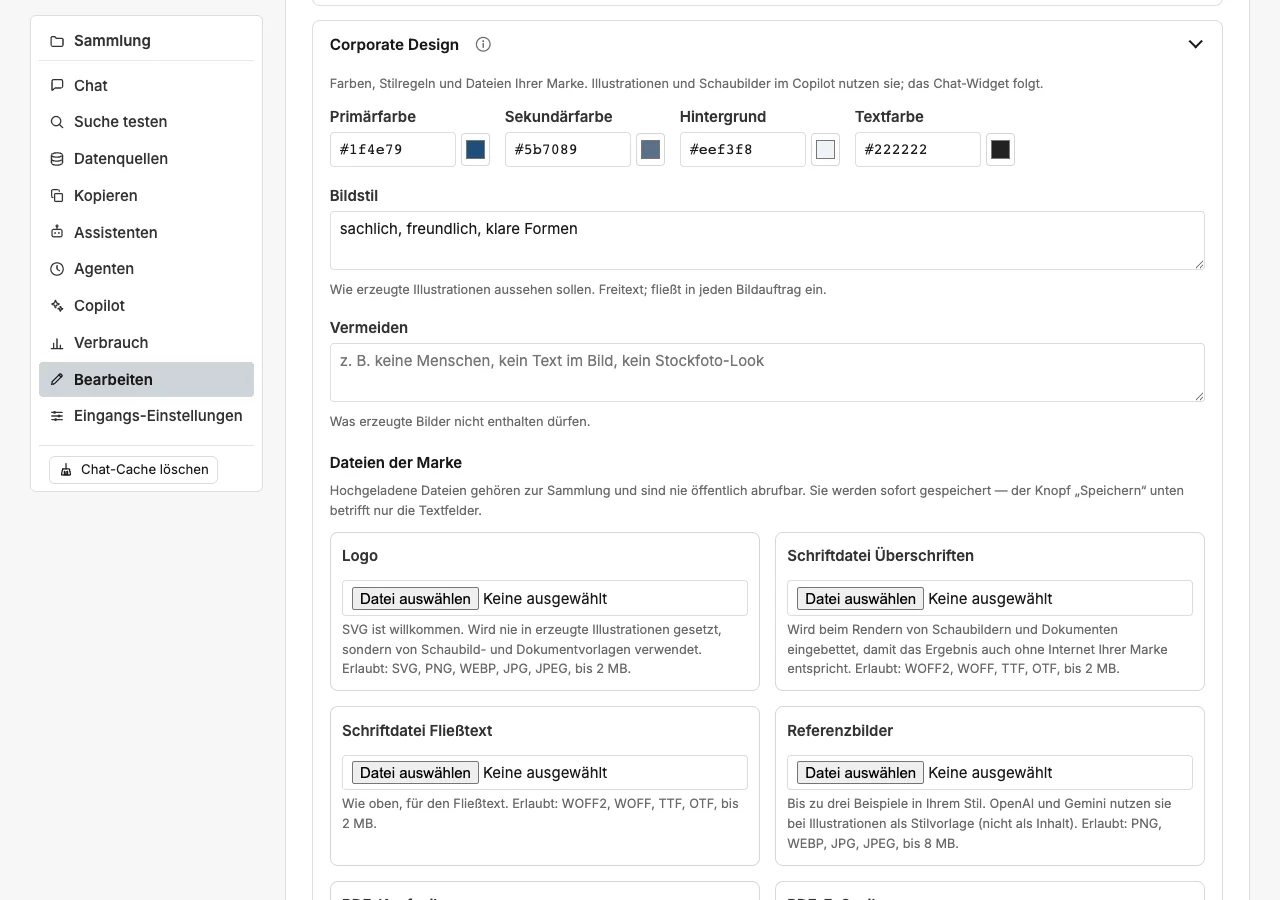
Colours, fonts and style rules of your brand, plus the files dAI Pro should have of your brand. The editorial Copilot hands the style settings to the image model so that generated illustrations match the website, and uses them to design its diagrams and documents (Chapter 18); later they will also feed the chat widget. All fields are optional; without a profile the Copilot works neutral, factual and light.
| Field | Meaning |
|---|---|
| Primary colour, Secondary colour, Background, Text colour | One colour value each in the notation #rrggbb, for instance #1e6470. The background applies to illustrations and diagrams unless the briefing asks for another one. |
| Image style | Free text describing how generated illustrations should look, for example “flat illustration, friendly, reduced, lots of white space”. Goes into every image brief. |
| Avoid | What generated images must not contain, for example “no people, no text in the image, no stock-photo look”. |
| Show “AI-generated” in the caption of generated images | Adds a visible note to the suggested caption: “AI-generated image.” for illustrations, “Diagram created with AI assistance.” for diagrams. The machine-readable marking in the file is always present regardless (Chapter 22). |
Brand files. Seven further fields take files. You pick the file on your computer and dAI Pro stores it with the collection; you no longer enter an address anywhere.
| Field | Formats | Size |
|---|---|---|
| Logo | SVG, PNG, WebP, JPG | up to 2 MB |
| Heading font file | WOFF2, WOFF, TTF, OTF | up to 2 MB |
| Body font file | WOFF2, WOFF, TTF, OTF | up to 2 MB |
| Reference images | PNG, WebP, JPG | up to 8 MB each, three at most |
| PDF header | PDF, SVG, PNG, WebP, JPG | up to 4 MB |
| PDF footer | PDF, SVG, PNG, WebP, JPG | up to 4 MB |
| Word template | DOTX, DOCX (without macros) | up to 5 MB |
Important for day-to-day use: files are saved the moment you select them. The “Save” button at the end of the form only concerns the text fields. A new file replaces the existing one of the same kind; with the reference images, a fourth image pushes out the oldest. “Remove” deletes a file permanently.
What the files are for: the diagram template places the logo at the top right of the image; documents without a letterhead carry it at the top right above the title. PDF header and PDF footer form the letterhead of the documents (section “Documents (PDF and Word)”). If a Word template is stored, the Word files are created in that template: styles, theme, headers and footers and page margins are kept, and dAI Pro only writes the content; the letterhead then applies to the PDF only. dAI Pro rejects templates with macros (DOTM, DOCM). dAI Pro places none of these files into illustrations. The two font files are embedded when diagrams and documents are rendered, so that the result appears in your brand's font even without internet access. The reference images are sent to the image model of OpenAI and Gemini as a style guide, not as content (Chapter 18).
The files are stored with the collection outside the public directory. Only someone who is signed in and has access to this collection can retrieve them. SVG files are sanitised on upload: scripts, event attributes and references to the outside are removed, the drawing itself is kept.
Documents (PDF and Word)
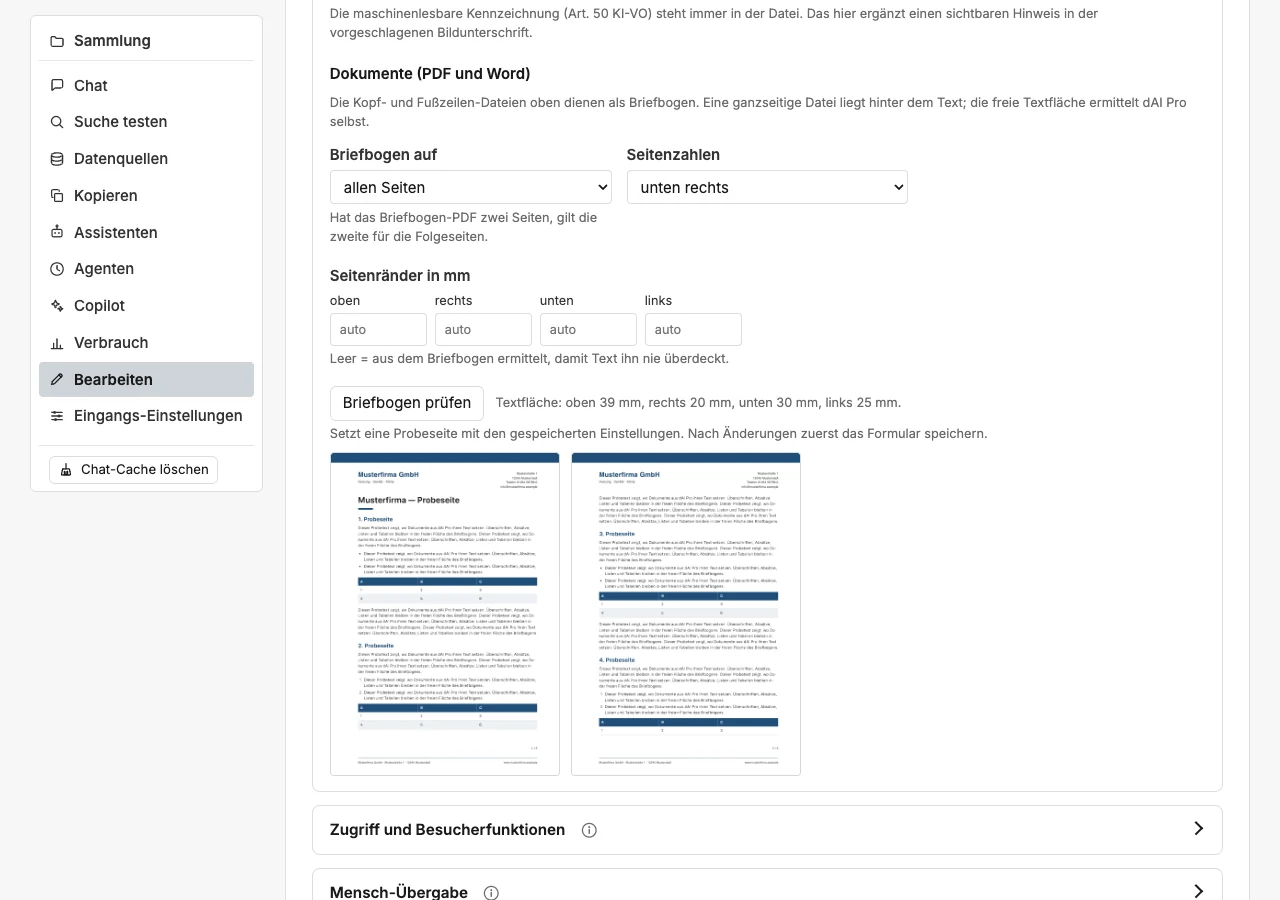
The files “PDF header” and “PDF footer” serve as the letterhead for the documents of the editorial Copilot (Chapter 18). dAI Pro classifies each file itself:
- Full letterhead. If the file takes up at least 60 per cent of the page height, typically a full-page PDF from Pages, Word or InDesign, it lies behind the text as a whole page. If the PDF has two pages, the second applies to the following pages.
- Strip. Narrower files sit at the top as a header and at the bottom as a footer. A PDF keeps its real width, an image spans the full page width.
Besides PDF, SVG, PNG, JPEG and WebP work. dAI Pro places a permission-protected PDF (for example "editing not allowed") under the text as a high-resolution image; the letterhead then no longer stays a vector in the PDF. A PDF that only opens with a password cannot be used; the Copilot reports this in the check report. In both cases it is better to upload an unprotected version.
Free area. dAI Pro rasterises the letterhead in cells of 2 mm and looks for the largest free area for the text, separately for the first and the following pages. The area must be at least half as wide and a good third as high as the page; a narrow column next to the logo does not count. The text keeps 5 mm away from everything printed on the letterhead and at least 15 to 18 mm from the edge of the sheet. The page margins are derived from this area.
| Field | Meaning |
|---|---|
| Letterhead on | all pages or first page only. If the letterhead PDF has two pages, the second applies to the following pages. Pages without a letterhead use standard margins. |
| Page numbers | bottom right, bottom centre, bottom left or none. The number appears in the format “1 / 7”, always in the free area above the footer, never on a line or address of the letterhead. |
| Page margins in mm | top, right, bottom, left. Empty means: determined from the letterhead so that text never covers it. An entered value applies to all pages. |
Check letterhead sets a two-page sample with the saved settings and shows the margins determined for the first page. So after changes, save the form first; the files themselves are already saved when you select them. Without a letterhead, the check reports that standard margins apply.
Fonts. dAI Pro embeds the uploaded fonts in every PDF. If the body font is a very thin cut with a weight below 300, such as “Thin”, the document sets the body text in the heading font as well. Word does not embed fonts: the font must be installed on the computer, otherwise Word replaces it. dAI Pro reads the family name for this from the font file.
Access and visitor features
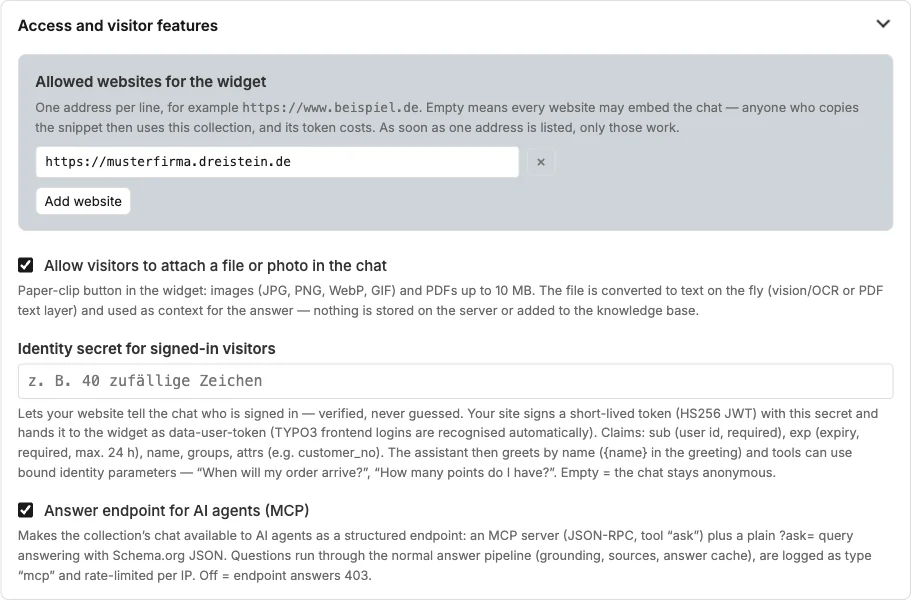
| Field | Meaning |
|---|---|
| Allowed websites | One address per line. Empty means: any website may embed the chat. As soon as an address is entered, only these work. Applies to chat, search, upload, handover and MCP. |
| Attach a file or photo | Paper clip in the chat: visitors attach up to five images or PDFs, each up to 10 MB, also by pasting from the clipboard or by dragging them in. The files are converted to text at the moment of the question and used as context, nothing is stored. What visitors see is described in the next section. |
| Notice next to the attach button | Shown next to the paper clip while nothing is attached. Empty = standard notice in the visitor's chat language: "Please do not upload sensitive personal data." Enter your own wording only if the processing of special categories of personal data (Art. 9 GDPR) has been expressly approved for this instance; it then applies in every chat language. |
| Identity secret | Lets your website tell the chat who is signed in, verified via a signed token. Chapter 13. |
| Answer endpoint for AI agents (MCP) | Provides the collection's chat as an endpoint for AI agents. Chapter 14. |
What visitors see when attaching files
Visitors have three ways to attach a file:
- Paper clip next to the input field, also with several files at once.
- Paste with Ctrl+V or Cmd+V, for example a screenshot from the clipboard. If the clipboard holds text and an image, the image is attached and the text goes into the input field.
- Drag files onto the chat window. While a file hovers over it, the window shows a dashed frame in the accent colour.
Above the input field, each file appears with a thumbnail, a PDF with a document icon, plus its name and a remove button. Up to five attachments are possible at the same time, and several files are read one after the other. The attachments belong to the next question: once its answer has arrived, they disappear from the input row again. For a further question about the same file, the visitor attaches it once more. The sent question shows them at the top of its bubble.
The chat matches uploaded images and PDFs against the knowledge base. If a file shows something from your documents, such as a wiring diagram from a brochure or an excerpt from a manual, the chat recognises the figure, names the document and page, and explains it with your knowledge instead of merely describing it in general terms. Files unrelated to the collection are answered from their own content.
The chat also reads scanned PDFs in which no text can be selected, such as scanned invoices or delivery notes. It recognises the text on the pages: with Mistral as the language model via Mistral Document AI, otherwise via the image understanding of the language model the collection uses for the chat. This takes a few seconds longer than a PDF with text. The first eight pages are read, without Mistral the first three.
Clicking a thumbnail enlarges it. The enlarged view closes via the button with the X, by clicking next to the image or with Escape.
The thumbnails are created only in the visitor's browser and are not transmitted. After the page is reloaded, the history shows only the file names. If a visitor uploads a great many files in a short time, the chat asks them to try again later.
If upload is switched off for the collection or for an embedding (Chapter 8), pasting and dragging do not work either.
Human handover
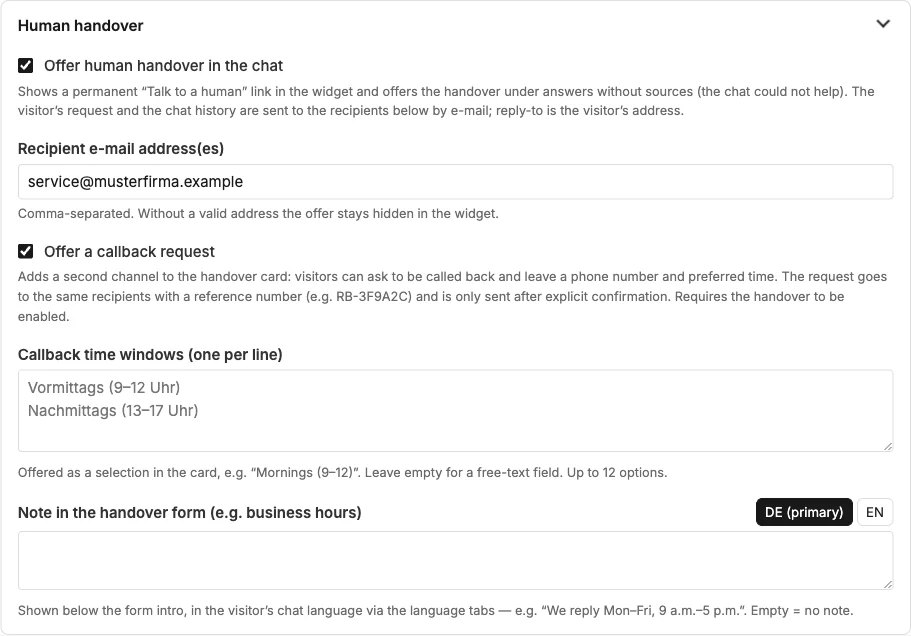
Shows the link “Talk to a human” in the chat and offers the handover when the chat could not help. Request and conversation history go by e-mail to the recipients; with “Offer a callback request”, visitors can leave a phone number and preferred time. Chapter 12 describes the process from the visitor's and the team's point of view.
Actions from the chat
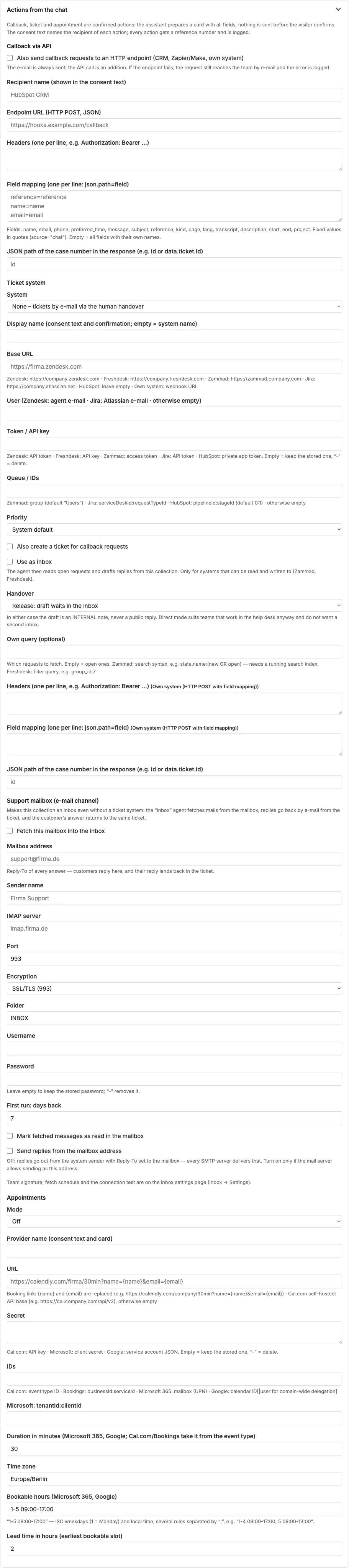
Callback, ticket and appointment are confirmed actions: the chat prepares a card with all fields; nothing is sent until the visitor confirms. Here you connect CRM, ticket system, support mailbox and appointment calendar. Chapter 12 explains every connection.
Voice chat
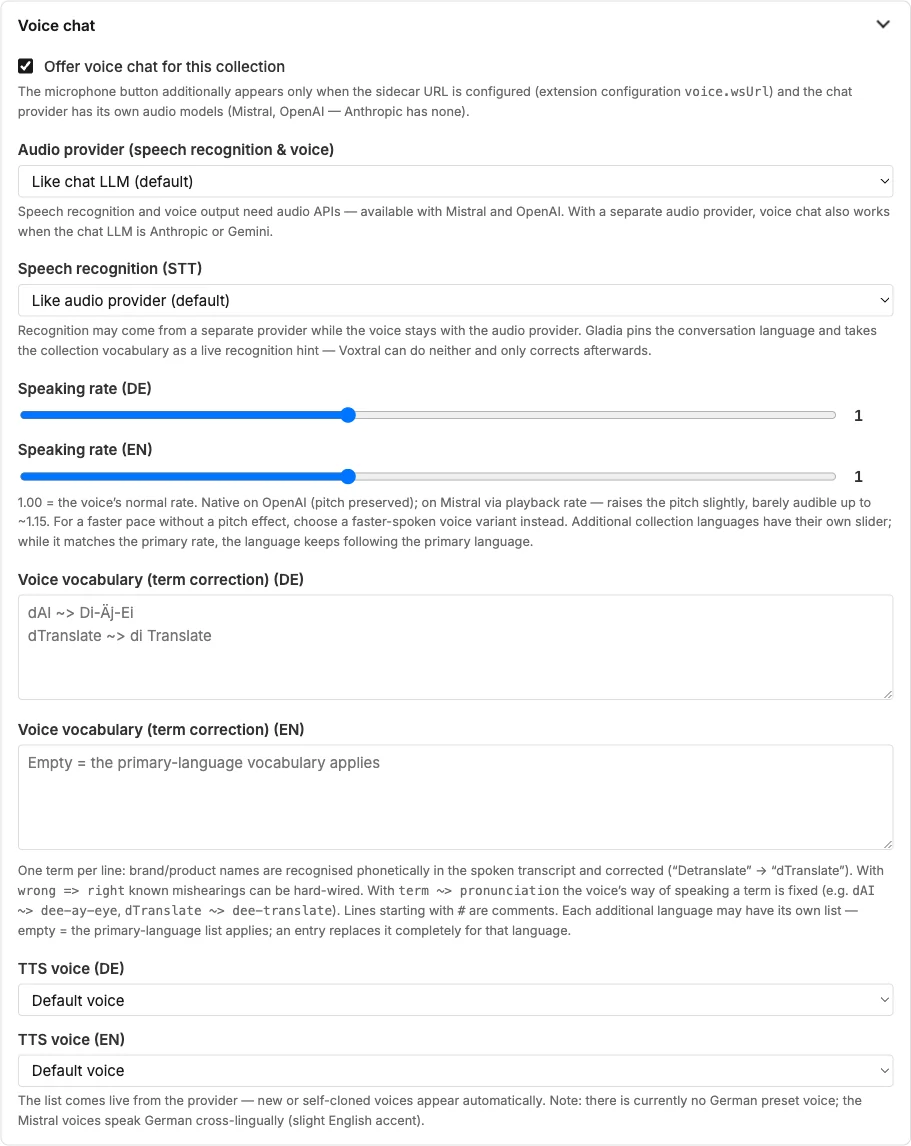
Enables the microphone button, chooses voice and speech recognition and maintains the vocabulary for brand and product names. Chapter 11.
Change log
Every change to a collection's settings is recorded: which field changed when, from which value to which, by whom and through which channel. Open the log via the “Show change log” button at the top of the “Edit” page or via the item of the same name in the collection's navigation rail. Anyone who may edit the collection may see it.
| Column | Meaning |
|---|---|
| Time | Date and time of the change. |
| User | Who made the change. With “View as”, the person actually signed in is recorded, not the borrowed view. Operator logins appear as “Betreiber (account)”, command-line commands with their name. |
| Channel | Backend (including its forms, which use the API behind the scenes), API (external systems with their own access), command line, demo. |
| Field | The technical name of the setting, as used in the API. |
| Before / After | The old and the new value, truncated to 2000 characters. |
Everything that controls processing is logged: language models and processing region, visitor functions (voice chat, upload, human handover, callback, MCP, feedback, simple language), limits and deadlines (image quota, CAG tokens), allowed websites and addresses, embedding, actions, main prompt and help texts, title, visibility and deletion. Technical timestamps and counters are not logged.
Secrets — API keys, the identity secret, tokens and passwords in the actions — never appear in the log. That such a value changed is noted; the value itself is shown only as “(changed — secret, not shown)”.
The log is your documentation of instructions in the sense of the data processing agreement (Annex A, row A18). It is never deleted automatically and only disappears together with the collection when its record is permanently deleted — for demo collections after they expire. An ordinary deletion in the backend leaves the log in place.
Frequently asked questions
Why can I no longer change the embedding LLM? The index is fixed to this model's vector dimension. For a different embedding model, create a new collection or enter it under “Additional language models”; a second index is then created.
I set the processing region, and after saving it says “No restriction”. None of the collection's language models processes in this region. Choose a configuration with a suitable region (Chapter 24) and set the region again.
Do the allowed websites also apply to the search? Yes, to all endpoints of the collection.
The field “Image model” only offers “None”. No LLM configuration of the instance is image-capable. The administration creates a configuration of type OpenAI or Google Gemini (Chapter 24); after that it appears here for selection.
The sample page still shows the old margins. Check letterhead uses the saved settings. Save the form and check again.
See also
- Chapter 7 · Good answers
- Chapter 12 · Human handover and actions
- Chapter 18 · Editorial copilot (illustrations, diagrams, documents)
- Chapter 20 · Processing region and sovereignty
- Chapter 24 · Configuring language models